
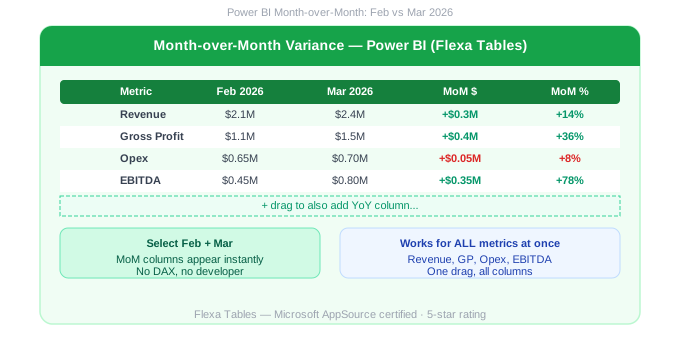
Power BI Month over Month Comparison Without DAX
"Can you show what changed vs last month?" — It's the most common mid-meeting request finance teams get. In Excel, it's a 30-second job. In native Power BI, it means a developer ticket, a DAX measure, and a wait. Here's how to eliminate that wait entirely.
In this article
1. What Is Month-over-Month Comparison in Power BI?
Month-over-Month (MoM) variance compares a metric in the current month to the same metric in the previous month. It's the most common financial comparison — used in every monthly P&L review, sales performance report, and operational dashboard.
| Metric | Feb 2026 | Mar 2026 | MoM $ | MoM % |
|---|---|---|---|---|
| Revenue | $2.1M | $2.4M | +$0.3M | +14% |
| Gross Profit | $1.1M | $1.5M | +$0.4M | +36% |
| Opex | $0.65M | $0.7M | +$0.05M | +8% |
2. Native DAX Approach (DATEADD / PREVIOUSMONTH)
There are two common DAX approaches for MoM in Power BI:
-- Option A: DATEADD
Revenue MoM %=
DIVIDE([Revenue] - CALCULATE([Revenue],
DATEADD('Date'[Date],-1,MONTH)),
CALCULATE([Revenue],DATEADD('Date'[Date],-1,MONTH)))
-- Option B: PREVIOUSMONTH
Revenue Prev Month=
CALCULATE([Revenue], PREVIOUSMONTH('Date'[Date]))
Both work — but both require a developer for each metric. For a report with 8 KPIs, that's 8 separate measures. Any new metric added later needs another measure.
3. MoM Without DAX — Drag-and-Drop Method
Flexa Tables builds MoM directly into the visual. After publishing, end users select "February 2026" and "March 2026" as their comparison periods — the MoM absolute and percentage columns appear instantly for every metric in the table.
Open published report in Power BI Service
No Power BI Desktop needed — works directly in the browser.
Select comparison periods
Choose "Feb 2026" as the base and "Mar 2026" as the comparison — or any two months.
MoM columns appear for all metrics instantly
Revenue MoM, Gross Profit MoM, EBITDA MoM — all in one action, no DAX.
4. Common MoM Scenarios
🏦
Monthly close review
Finance team reviews March P&L vs February — variance by department, cost center, and GL account. Done in minutes, self-service.
📈
Sales performance
Sales managers compare this month vs last month by rep and territory — add MoM column themselves without IT help.
⚡
Operations tracking
Plant managers monitor MoM production costs by facility. Identify cost increases the moment they appear — no developer needed.
🛒
Retail category review
Category managers compare MoM sales by product line and store — restructuring the view for different stakeholders self-service.
Add MoM to Power BI without DAX — try free
Install Flexa Tables from Microsoft AppSource. Free trial, no credit card, 5-minute setup.
Get Free Trial on AppSource →See all variance types: DoD, MoM, YoY →
5. Common MoM Mistakes in Native Power BI
Even experienced Power BI developers encounter these problems when building MoM with DAX:
- Missing Date table: DATEADD and PREVIOUSMONTH require a properly marked Date table in your model. Without one, MoM columns return blank.
- Filter context breaks: MoM measures behave unexpectedly with certain slicer combinations — filtering by region while comparing months often produces incorrect results depending on how the Date table relates to the fact table.
- Partial months: Running a report mid-month means comparing a full February to a partial March — misleading without additional DAX to handle incomplete periods.
- One measure per metric: Revenue MoM, Gross Profit MoM, EBITDA MoM, Opex MoM — each is a separate measure. Adding a new KPI means writing another measure, testing it, and republishing.
Flexa Tables avoids all of these issues. Users select any two months directly in the published report, and the comparison happens at the visual level — independent of Date table configuration or filter context.
6. MoM in the Full Variance Picture
MoM is the most frequently requested variance type — but most reporting workflows also need YoY for annual context and DoD for operational monitoring. Rather than maintaining three separate DAX measure sets, Flexa Tables includes all three as built-in one-click options.
📊 Full guide: Variance Analysis in Power BI — DoD, MoM, YoY Without DAX
All three variance types covered in one place
📊 Power BI P&L Report: add MoM variance to a self-service finance report
→ Read: /blogs/power-bi-pl-report-how-to-make-it-fully-selfservice-for-finance-teams-2026
FAQ
How do I calculate Month-over-Month in Power BI without DAX?
Use Flexa Tables from AppSource — a Microsoft-certified Power BI custom visual. After publishing your report, end users select two months to compare and the MoM column (absolute + %) appears instantly for all metrics. No DATEADD or PREVIOUSMONTH measures required.
What is the difference between DATEADD and PREVIOUSMONTH in Power BI?
PREVIOUSMONTH is a shortcut that returns all dates in the previous month. DATEADD is more flexible — it shifts any period by a specified number of intervals (days, months, quarters, years). Both are used for MoM calculations. DATEADD is preferred when you need more control over partial months or custom fiscal periods.
Can I show MoM and YoY in the same Power BI table?
Yes, with Flexa Tables. End users can add multiple variance columns simultaneously — showing MoM and YoY side by side for every metric, without writing separate DAX measures for each. Natively in Power BI, this requires separate DAX measures for each comparison column.
Flexa Intel Team
Power BI Custom Visuals — flexaintel.com
We build Microsoft-certified Power BI visuals that close the gap between what Power BI does natively and what analysts and finance teams actually need.


