
Power BI Variance Analysis Without DAX
Every Power BI tutorial on variance analysis starts the same way: "First, write a DAX measure..." But what if you don't want to write DAX? What if your end-users need to add a Month-over-Month column themselves — right inside the published report, without bothering the BI developer? This guide shows you both paths.
In this article
1. What Is Variance Analysis in Power BI?
Variance analysis means comparing a metric across two time periods — or against a target — to measure change. In reporting, it typically shows up as three types:
📅
DoD
Day-over-Day
Today vs yesterday
📆
MoM
Month-over-Month
This month vs last
🗓️
YoY
Year-over-Year
This year vs last year
In Excel, adding a "% change" column to a pivot table takes about 10 seconds — right-click, Show Values As, % Difference From. In Power BI, the same result requires writing and maintaining DAX measures. That gap is the entire subject of this guide.
2. The Native DAX Method (And Why It's Painful)
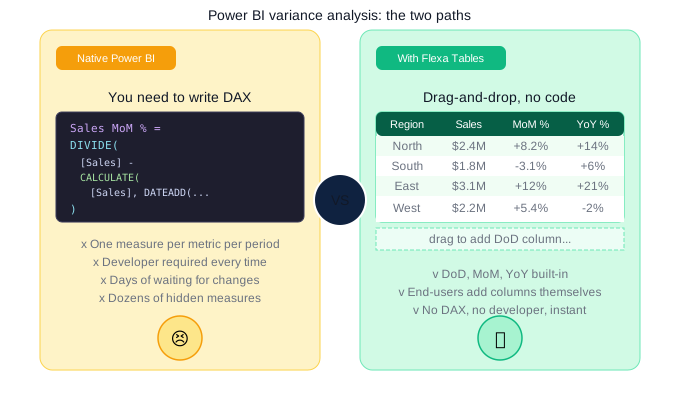
The standard approach in native Power BI requires writing a separate DAX measure for each comparison. Here's what a Month-over-Month measure looks like:
Sales MoM %=
DIVIDE(
[Total Sales]-
CALCULATE([Total Sales],
DATEADD('Date'[Date], -1, MONTH)),
CALCULATE([Total Sales],
DATEADD('Date'[Date], -1, MONTH))
)
That's just one measure for one metric. A typical finance report needs:
- Revenue MoM % + Revenue YoY %
- Gross Profit MoM % + Gross Profit YoY %
- Operating Cost MoM % + Operating Cost YoY %
- EBITDA MoM % + EBITDA YoY %
That's already 8 measures. Add DoD and a budget variance column and you're looking at 15–20 hidden measures that someone has to maintain every time a metric name changes or a new date table is introduced.
Every time an executive asks "can you add a Year-over-Year column?" — that's a change request, a ticket, a wait. In Excel the analyst does it themselves in 10 seconds. In native Power BI, it goes to the BI team's backlog.
3. DoD, MoM, YoY — What Each Means and When to Use It
| Type | Compares | Best for | Common users |
|---|---|---|---|
| DoD | Today vs yesterday | Ops monitoring, daily KPIs | Operations, supply chain |
| MoM | This month vs last month | Sales performance, cost tracking | Sales, Finance, Marketing |
| YoY | This year vs last year | Strategic reviews, board reports | Executives, Finance leadership |
In most reporting environments, teams need all three — sometimes simultaneously. A finance director reviewing a P&L wants to see this month's revenue, the MoM change, and the YoY change side by side. Building that natively in Power BI means three separate DAX measures per metric.
4. Variance Analysis Without DAX: The Drag-and-Drop Method
Flexa Tables is a Microsoft-certified Power BI custom visual available on AppSource that eliminates the DAX requirement entirely for variance analysis. Here's how it compares:
Native Power BI approach
- Open Power BI Desktop
- Write DAX measure for each variance
- Add measure to Matrix visual
- Republish to Power BI Service
- Repeat for every new metric
- ⏱ Hours to days per change
Flexa Tables approach
- Install Flexa Tables from AppSource
- Add visual to report canvas
- Configure initial fields
- Publish once
- End-users add variance columns themselves
- ⚡ Seconds, no developer needed
What end-users can do in the published report
- Select any two time periods and a variance column appears automatically — absolute value and percentage
- Switch between DoD, MoM, and YoY from a simple dropdown — no page reload, no developer
- Restructure the entire table — drag rows to columns, reorder dimensions, change groupings
- All while connected to live data — no Excel export, no data staleness
A finance analyst can open the published report on Monday morning and add a YoY revenue column for their board presentation — without filing a ticket, without waiting for IT, without exporting to Excel. That's the actual workflow change Flexa Tables enables.
5. Real-World Use Cases by Team
🏦
Finance & FP&A
P&L reporting with budget vs actual variance. Teams review MoM cost changes and YoY revenue trends without rebuilding the report for each stakeholder meeting.
📈
Sales Operations
Regional sales variance across territories. Sales managers compare MoM performance per rep or region — restructuring the table themselves without waiting on BI team.
⚡
Energy & Operations
Production output DoD and MoM across sites and energy types. Operations managers spot underperforming assets and seasonal variance without IT involvement.
🏭
Manufacturing
Inventory and output variance by product line, plant, and period. Supply chain teams identify MoM cost spikes and YoY efficiency trends self-service.
Try DoD, MoM, and YoY in Power BI — no DAX needed
Install Flexa Tables from Microsoft AppSource. Free trial, no credit card required. Set up in under 5 minutes.
Get Free Trial on AppSource →Read: Dynamic Pivot Tables in Power BI — The Complete Guide
6. Next Steps — Full Variance Analysis Landing Page
This guide covers the core concepts. For a complete breakdown of how DoD, MoM, and YoY work inside Flexa Tables — including the setup guide, industry use cases, and a comparison with native Power BI and competitors — see the dedicated landing page:
📊 Variance Analysis in Power BI: DoD, MoM, YoY Without DAX — Full Guide
Covers setup in 4 steps, comparison table, industry use cases, and 8-question FAQ
📊 Also need pivot tables? Power BI Pivot Table: Add Excel-Style Pivoting Without DAX
FAQ
Can Power BI do variance analysis without DAX?
Not natively. Power BI's built-in Matrix visual requires DAX measures to calculate period-over-period comparisons. However, Flexa Tables — a Microsoft-certified custom visual on AppSource — adds DoD, MoM, and YoY variance columns via drag-and-drop, with zero DAX required.
What is the difference between DoD, MoM, and YoY in Power BI?
DoD (Day-over-Day) compares today versus yesterday — best for operational monitoring. MoM (Month-over-Month) compares this month to last month — standard for sales and finance. YoY (Year-over-Year) compares this year to last year — used in strategic and board-level reporting. In native Power BI, each requires a separate DAX measure.
How do I add a MoM column in Power BI without writing code?
Install Flexa Tables from Microsoft AppSource, add it to your report canvas, configure your initial fields, and publish. Once published, end-users can select any two time periods and a MoM comparison column appears automatically — no DAX, no developer, no republishing needed.
Does Flexa Tables work with existing Power BI data models?
Yes. Flexa Tables uses your existing data model — no changes to your data source, date table, or existing DAX measures required. It installs like any other Power BI visual and works with DirectQuery, Import, and composite models.
Is there a free version of Flexa Tables?
Yes. Flexa Tables offers a free trial directly from Microsoft AppSource — no credit card needed. After the trial, the Single License is $7/month per user. Enterprise pricing (all viewers included, developer key only) is available at [email support].
Flexa Intel Team
Power BI Custom Visuals — flexaintel.com
We build Microsoft-certified Power BI visuals that close the gap between what Power BI does natively and what analysts and finance teams actually need. Flexa Tables is available on Microsoft AppSource with a 5-star rating.


