
Power BI Day over Day (DoD) Analysis: Operations Teams
Finance teams want MoM. Executives want YoY. But operations, logistics, and supply chain teams need something more immediate: what changed today versus yesterday? Day-over-Day analysis is the least-discussed variance type in Power BI — and one of the hardest to build natively.
In this article
1. What Is Day-over-Day Analysis in Power BI?
Day-over-Day (DoD) analysis compares a metric for today against the same metric for yesterday. It shows the most granular and immediate form of variance — essential for teams that need to monitor performance at a daily cadence rather than monthly or quarterly.
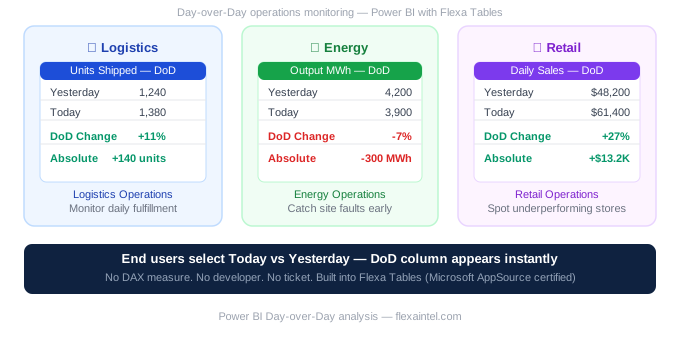
📦
Units shipped
Yesterday: 1,240
Today: 1,380
+11%
⚡
Production output
Yesterday: 4.2MWh
Today: 3.9MWh
-7%
🛒
Daily sales
Yesterday: $48K
Today: $61K
+27%
2. Who Needs DoD and Why
Monthly and quarterly variances catch problems after the fact. DoD variance catches them in real time — which matters enormously in fast-moving operational environments:
🏭
Manufacturing
Production line managers monitor daily output vs yesterday to identify equipment issues or staffing problems before they compound.
📦
Logistics & Fulfillment
Warehouse managers compare daily shipments, returns, and processing times to spot delays before they affect customer SLAs.
⚡
Energy Operations
Operations teams track daily generation by site. A sudden DoD drop in output signals a potential fault — catchable in real time.
🛒
Retail Operations
Store managers compare daily transactions and basket size vs yesterday to spot promotions working or underperforming locations.
3. Why DoD Is Especially Complex to Build Natively
Unlike MoM (PREVIOUSMONTH) or YoY (SAMEPERIODLASTYEAR), Power BI has no dedicated DoD function. You must use DATEADD with DAY granularity:
Units Shipped DoD %=
DIVIDE([Units Shipped] -
CALCULATE([Units Shipped],
DATEADD('Date'[Date], -1, DAY)),
CALCULATE([Units Shipped],
DATEADD('Date'[Date], -1, DAY)))
DoD in Power BI also requires handling weekends, public holidays, and non-trading days carefully — otherwise comparing a Monday to a Sunday gives meaningless results. Each of these edge cases requires additional DAX logic.
4. DoD Without DAX in Power BI
Flexa Tables includes built-in DoD comparison. End users select "Today" and "Yesterday" as their two comparison periods — or any two specific dates — and the DoD variance column appears immediately for all metrics.
Operations manager opens the dashboard at 9am, selects today vs yesterday, and immediately sees which sites, products, or metrics moved significantly overnight — without contacting the BI team for a new DAX measure.
Add DoD to Power BI — no DAX, free trial
Microsoft AppSource certified. Setup in under 5 minutes.
Get Free Trial on AppSource →Full variance guide: DoD + MoM + YoY →
5. DoD Without DAX — Step-by-Step Setup
Setting up Day-over-Day analysis with Flexa Tables takes under 5 minutes and requires no changes to your existing data model.
- Install Flexa Tables from Microsoft AppSource — in Power BI Desktop go to Insert → More Visuals → AppSource, search "Flexa Tables"
- Add the visual to your existing report canvas. Connect your date field, dimension rows, and metric values to the field wells
- Publish to Power BI Service as normal — no additional settings required
- In the published report: click the variance button → select DoD → choose today and yesterday as the comparison periods
- The DoD column appears instantly for all metrics — absolute change and percentage, color-coded red/green automatically
⚠️ Edge cases: weekends and non-trading days
In native DAX, comparing Monday to Sunday gives meaningless DoD results — you need additional logic to skip weekends and public holidays. Flexa Tables lets users select any two specific dates, so operations teams can compare Monday to the previous Friday in two clicks, without any custom calendar DAX.
6. DoD, MoM, and YoY — When to Use Each
DoD is one of three variance types built into Flexa Tables. Here is when each applies:
| Type | Compares | Best for |
|---|---|---|
| DoD | Today vs Yesterday | Operations, logistics, daily production KPIs |
| MoM | This month vs Last month | Finance, sales, monthly P&L review |
| YoY | This year vs Last year | Executive dashboards, board packs, annual reviews |
📊 Full variance analysis guide — all three types covered
DoD, MoM, YoY without DAX in one place
📊 Need pivot tables too? Add Excel-style pivoting to Power BI
FAQ
How do I do Day-over-Day analysis in Power BI?
Natively, use DATEADD with -1 DAY inside a CALCULATE expression. With Flexa Tables, end users select two dates in the published report and DoD variance appears instantly — no DAX required.
Does Power BI have a built-in Day-over-Day function?
No. Unlike PREVIOUSMONTH or SAMEPERIODLASTYEAR, Power BI has no dedicated DoD function. You must use DATEADD('Date'[Date], -1, DAY) inside CALCULATE, and handle weekends/holidays separately. Flexa Tables includes built-in DoD with no DAX required.
Flexa Intel Team
Power BI Custom Visuals — flexaintel.com
We build Microsoft-certified Power BI visuals that close the gap between what Power BI does natively and what analysts and finance teams actually need.


