
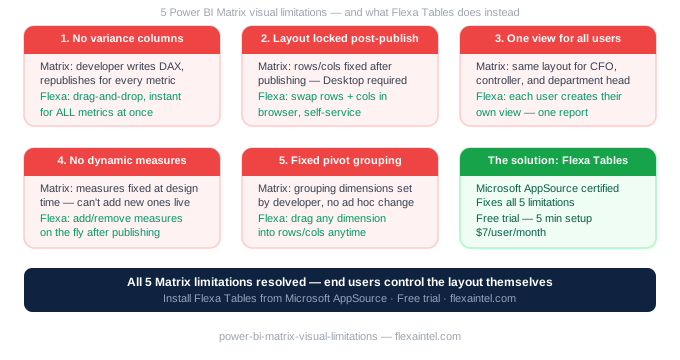
Power BI Matrix Visual Limitations Finance Teams
The Power BI Matrix visual is the most-used table visual in financial reporting. It's also the most complained about — because there are 5 things it simply cannot do, and every finance team hits at least 3 of them every single month. Here's what they are, and what actually works instead.
In this article
Before diving in: the Matrix visual is not a bad visual. For fixed, governed executive dashboards, it's excellent. The problem arises when finance teams need something more dynamic — and Matrix was never built for that.
1. Cannot Add Variance Columns After Publishing
This is the limitation that frustrates finance teams most. Once a Matrix report is published to Power BI Service, end users cannot add a Month-over-Month or Year-over-Year column themselves. Every variance column must be pre-built as a DAX measure by a developer before publishing.
CFO opens the monthly P&L report and asks: "Can you add a column showing the change from last month?" Finance analyst cannot do it. They file a ticket. Developer adds a DAX measure and republishes. 2 days later, the report has the column — but the board meeting was yesterday.
Workaround: Pre-build every likely variance measure (MoM, YoY, DoD, Budget vs Actual) before publishing. This creates bloat — 15–25 hidden measures in the model — and still can't handle requests for new comparisons. Or use Flexa Tables, which gives end users built-in variance columns they add themselves.
2. Cannot Swap Rows and Columns Without Desktop
The Matrix layout is fixed at design time. If you build a report with "Department" in rows and "Month" in columns, end users cannot switch to "Month" in rows and "Department" in columns. Every axis swap requires opening Power BI Desktop and republishing.
In Excel, this is a 2-second drag operation. In Power BI Matrix, it's a developer task. For teams that need to present the same data to different stakeholders in different orientations, this forces either multiple reports (maintenance burden) or constant developer involvement (bottleneck).
3. Cannot Create Different Views for Different Audiences
Finance directors want a high-level P&L summary. Controllers want full cost center detail. Department heads want only their slice. With Matrix, these are typically three separate reports — each requiring maintenance when the data model changes.
Personalise Visuals (Level 3 self-service) partially helps — users can add or remove fields — but it doesn't support restructuring the layout or creating truly different views of the same data in one session.
4. Cannot Add or Remove Measures Dynamically
The measures shown in a Matrix visual are fixed at publish time. If a stakeholder wants to see Gross Margin % added to the table, that requires a developer to create the measure (if it doesn't exist) and republish.
Even with Personalise Visuals enabled, you can only add measures that already exist in the data model. Creating new calculated columns or measures on the fly is not possible for end users.
5. Cannot Do Pivot-Style Grouping Without Developer
In Excel, you can drag "Region" into the pivot and instantly group all data by region. In Power BI Matrix, the grouping dimensions are fixed. End users can drill down predefined hierarchies — but they cannot add a new grouping dimension (e.g., "show me this by product category instead of region") without developer involvement.
What Actually Works
| Limitation | Native Matrix | Flexa Tables |
|---|---|---|
| Add variance columns after publish | ❌ | ✅ |
| Swap rows and columns | ❌ | ✅ |
| Different views per audience | ❌ | ✅ |
| Dynamic grouping by dimension | ❌ | ✅ |
| Self-service without developer | ❌ | ✅ |
Flexa Tables is a Microsoft-certified Power BI custom visual on AppSource that addresses all five limitations. It's not a replacement for Matrix in every scenario — fixed executive dashboards still work fine with Matrix. But for reports where finance teams need to explore, compare, and restructure data, Flexa Tables is the practical solution.
Overcome Matrix limitations — free trial
Flexa Tables on Microsoft AppSource. 5-minute setup, no credit card required.
Get Free Trial on AppSource →Read: Power BI Self-Service Analytics — What It Actually Means →
Why can't Power BI Matrix add variance columns after publishing?
The Matrix visual layout is fixed at design time in Power BI Desktop. Once published, end users can only interact with pre-defined fields and measures. Variance columns (MoM, YoY) must be built as DAX measures before publishing. Flexa Tables removes this restriction — end users add variance columns themselves in the published report.
Is there an alternative to Power BI Matrix for finance reporting?
Yes. Flexa Tables is a Microsoft-certified alternative on AppSource that adds drag-and-drop pivot functionality, built-in DoD/MoM/YoY variance, and full end-user layout control — inside published Power BI reports. It uses your existing data model with no changes required.
Flexa Intel Team
Power BI Custom Visuals — flexaintel.com
We build Microsoft-certified Power BI visuals that close the gap between what Power BI does natively and what analysts and finance teams actually need.


