
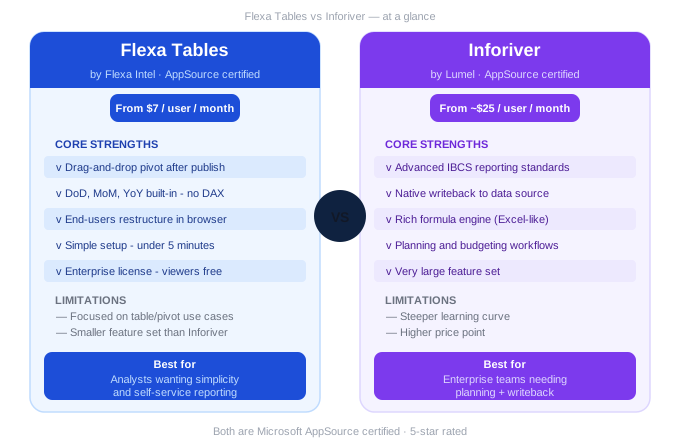
Flexa Tables vs Inforiver: Which Power BI Visual Is Right for Your Team? (2026)
Both Flexa Tables and Inforiver are Microsoft-certified Power BI visuals with 5-star AppSource ratings. Both add pivot-style functionality that the native Matrix visual can't match. But they're built for different teams, different workflows, and very different budgets. Here's an honest comparison.
In this article
1. Quick Overview: What Each Product Does
Both visuals solve the same root problem: Power BI's native Matrix visual locks the layout after publishing, meaning end users can't rearrange fields, add variance columns, or restructure the table without developer involvement. Flexa Tables and Inforiver each close that gap — but with very different philosophies.
Flexa Tables
by Flexa Intel
Flexa Tables is built specifically to bring Excel-style pivot table flexibility into Power BI. The focus is simplicity and self-service: end users drag fields, add variance columns, and restructure the table — all in the published report, all without code. Setup takes under 5 minutes.
See our full Power BI pivot table guide →Inforiver
by Lumel Technologies
Inforiver is a comprehensive reporting and planning platform. Beyond pivot tables and variance analysis, it includes writeback to data sources, a native formula engine, IBCS standards compliance, budgeting workflows, and a very large feature set. It's closer to a full reporting suite than a single visual.
Do you need a simple, fast pivot table with self-service variance — or a full reporting and planning platform? The answer determines which tool is right for you, and it also determines how much you'll spend.
2. Side-by-Side Feature Comparison
| Feature | Flexa Tables | Inforiver |
|---|---|---|
| Core pivot functionality | ||
| Drag-and-drop after publish | ✅ Yes | ✅ Yes |
| MoM / YoY variance (no DAX) | ✅ Built-in | ✅ Built-in |
| End-user self-service | ✅ Core focus | ✅ Yes |
| Setup time | ✅ Under 5 min | ⚠️ Longer learning curve |
| Advanced features | ||
| Writeback to data source | ❌ No | ✅ Yes |
| Native formula engine | ❌ No | ✅ Excel-like formulas |
| IBCS standards compliance | ❌ No | ✅ Yes |
| Planning & budgeting workflows | ❌ No | ✅ Yes |
| Pricing & licensing | ||
| Starting price | ✅ $7 / user / month | ⚠️ ~$25 / user / month |
| Enterprise (viewers free) | ✅ Yes | ⚠️ Per-user pricing |
| Free trial | ✅ AppSource, no card | ✅ AppSource trial |
3. Pricing Comparison
Pricing is where the two products diverge most significantly.
Flexa Tables pricing
Single License
$7 / user / month
Both builders and viewers need a key
Enterprise License
Contact for pricing
Only developers need a key — all viewers included
Inforiver pricing
Analytics+ (reporting)
~$25 / user / month
Reporting and variance features
Enterprise (with writeback)
Contact for pricing
Full planning + budgeting suite
For a team of 50 users: Flexa Tables costs ~$350/month. Inforiver Analytics+ costs ~$1,250/month. If your team just needs pivot tables and variance columns — not writeback or planning workflows — the price difference is hard to justify.
4. Which One Is Right for Your Use Case?
The choice usually comes down to one question: do you need writeback and planning workflows, or just flexible self-service reporting?
Choose Flexa Tables if...
- Your team needs pivot-style flexibility in published reports
- You want MoM/YoY/DoD variance without DAX
- End users need to explore data themselves without developers
- You have a limited budget or want to start small
- You want to be up and running in under 5 minutes
Choose Inforiver if...
- You need writeback — users entering data back into the source
- Your team does budgeting and planning inside Power BI
- You need IBCS-standard charts and tables for management reporting
- You want a formula engine similar to Excel
- Budget allows for a full reporting platform
By team type
🏦
Finance reporting only
P&L, budget vs actual, variance analysis, board reports
→ Flexa Tables
📋
Finance + planning
Reporting AND budget input, forecast updates, writeback
→ Inforiver
📊
BI / Analytics teams
Self-service reports for multiple business teams
→ Flexa Tables
5. Verdict
There's no universally "better" choice — these are genuinely different products at different price points.
Flexa Tables wins on simplicity, speed, and price. If your team's core need is pivot-style flexibility and variance analysis in published Power BI reports — without a long setup process or a large budget — Flexa Tables is the right choice. It does one thing extremely well.
For a feature-level breakdown of what Flexa Tables adds to Power BI, see: Power BI Pivot Table: Full Guide.
Inforiver wins on depth and planning features. If your team needs writeback, a formula engine, IBCS compliance, or full planning and budgeting workflows inside Power BI — Inforiver is built for that. It's a significantly larger investment in both money and implementation time, but it covers use cases Flexa Tables doesn't attempt.
Start with Flexa Tables. Both products offer free trials on AppSource — try Flexa Tables first since it takes under 5 minutes to set up and covers the majority of self-service reporting use cases at a fraction of the cost. If you outgrow it and need writeback or planning workflows, evaluate Inforiver at that point.
Try Flexa Tables free — no credit card needed
Install from Microsoft AppSource and start your free trial in under 2 minutes.
Get Free Trial on AppSource →Related: Power BI Pivot Table vs Excel — What Nobody Tells You (2026)
📊 Variance Analysis in Power BI Without DAX — Full Guide
See exactly how Flexa Tables handles DoD, MoM, and YoY — the core differentiator vs Inforiver
📊 Power BI Pivot Table: The full guide to drag-and-drop pivoting
📊 Best Power BI Table Visuals on AppSource 2026: Honest Comparison
→ Read: /blogs/best-power-bi-table-visuals-on-appsource-in-2026-honest-comparison
FAQ
Is Flexa Tables better than Inforiver?
It depends on your use case. Flexa Tables is simpler, faster to set up, and significantly cheaper — making it the better choice for teams that primarily need pivot-style flexibility and variance analysis. Inforiver is more powerful overall, with writeback, planning workflows, and a native formula engine — but at a higher price and steeper learning curve.
What is the difference between Flexa Tables and Inforiver?
Flexa Tables focuses specifically on drag-and-drop pivot tables and variance analysis (DoD, MoM, YoY) in published Power BI reports. Inforiver is a broader reporting and planning platform that also includes writeback, a formula engine, IBCS standards, and budgeting workflows — at roughly 3–4x the price.
Can I use both Flexa Tables and Inforiver in the same Power BI report?
Technically yes — both are custom visuals that can coexist in the same report. In practice, most teams choose one or the other since they serve overlapping pivot/variance use cases. Using both would be unusual and unnecessary for most reporting scenarios.
Does Flexa Tables support writeback?
No. Flexa Tables is a read-only reporting visual — it displays and analyzes data but does not write back to any data source. If writeback is a requirement (e.g. users entering budget values directly into Power BI), Inforiver would be the better choice.
How does Flexa Tables pricing compare to Inforiver for a large team?
For 50 users: Flexa Tables Single License costs approximately $350/month. Inforiver Analytics+ costs approximately $1,250/month. Flexa Tables also offers an Enterprise License where only developers pay — viewers are free — which significantly reduces cost for large read-only audiences. Contact [email support] for enterprise pricing.
Flexa Intel Team
Power BI Custom Visuals — flexaintel.com
We build Microsoft-certified Power BI visuals that close the gap between what Power BI does natively and what analysts and finance teams actually need. Flexa Tables is available on Microsoft AppSource with a 5-star rating.


