
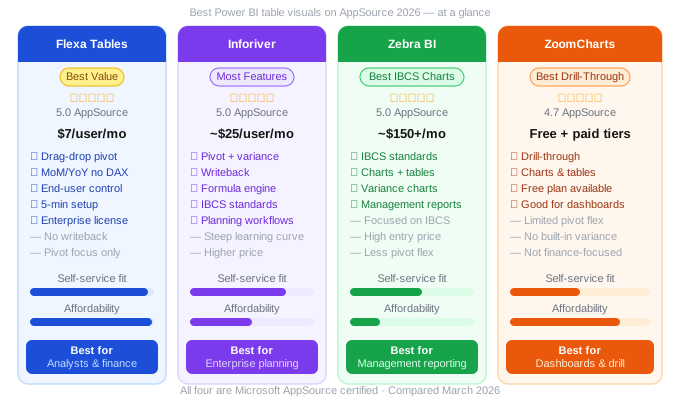
Best Power BI Table Visuals on AppSource in 2026 (Honest Comparison)
Power BI's native Matrix visual is powerful — but it has well-known limits: fixed layouts, no drag-and-drop after publishing, and variance analysis that requires DAX. The custom visual ecosystem on Microsoft AppSource has produced several strong alternatives. Here's an honest look at the best ones in 2026.
In this article
1. What We Evaluated and Why
This comparison focuses specifically on table and matrix visuals — not chart visuals. We're comparing tools that replace or extend the native Power BI Matrix for scenarios involving tabular data, pivot-style analysis, and financial reporting.
We evaluated each visual across five dimensions:
🔄
Self-service
±
Variance
⚡
Setup speed
💰
Pricing
🎯
Use case fit
All four visuals reviewed here are available on Microsoft AppSource and are compatible with Power BI Desktop and Power BI Service. Pricing figures are based on publicly available information as of March 2026.
2. Flexa Tables — Best Value for Self-Service Pivoting
Flexa Tables by Flexa Intel
$7/user/month · 5.0★ on AppSource · Microsoft certified
Flexa Tables is built for one thing: giving Power BI end users the drag-and-drop pivot table experience they're used to in Excel — directly inside published reports. It's the most focused tool in this comparison, and that focus shows in how easy it is to use.
What it does well
- Drag-and-drop after publishing: End users restructure the table layout in the browser — no Power BI Desktop, no developer involvement
- Built-in DoD, MoM, YoY variance: Select two periods and the comparison column appears instantly — zero DAX required
- Fastest setup in this comparison: Under 5 minutes from AppSource install to a working pivot table in your report
- Best pricing: $7/month per user on Single License; Enterprise License covers all viewers with only developers paying
Limitations
- No writeback — read-only reporting only
- Focused on table/pivot use cases — not a full reporting suite
Best for:
Finance teams, FP&A analysts, and BI teams who need end users to explore data themselves. Ideal when your primary need is pivot-style flexibility and variance analysis — not writeback or planning.
Full feature breakdown: Power BI Pivot Table with Flexa Tables — Complete Guide.
3. Inforiver — Most Feature-Rich
Inforiver Analytics+ by Lumel
~$25/user/month · 5.0★ on AppSource · Microsoft certified
Inforiver is arguably the most powerful reporting visual on AppSource. It goes well beyond pivot tables — it's closer to a complete reporting and planning platform embedded inside Power BI. The breadth of features is impressive.
What it does well
- Writeback: Users can enter values directly into the report that write back to the data source — essential for budgeting and forecasting workflows
- Native formula engine: Excel-style formulas for complex calculations without DAX
- IBCS standards: Built-in IBCS-compliant chart and table formatting for management reporting
- Planning and budgeting: Supports full planning workflows, including scenario modelling
Limitations
- Steeper learning curve — more complex to configure and use
- Higher price point — roughly 3–4x the cost of Flexa Tables per user
Best for:
Enterprise finance teams that need writeback, planning workflows, or IBCS-standard reporting — and have the budget and implementation time for a more complex tool.
4. Zebra BI — Best for IBCS Management Reporting
Zebra BI Tables & Charts
~$150+/month · 5.0★ on AppSource · Microsoft certified
Zebra BI is the specialist tool for IBCS (International Business Communication Standards) reporting. If your organization uses IBCS for management reporting — with specific chart types, variance indicators, and visual standards — Zebra BI is the strongest option available for Power BI.
What it does well
- IBCS compliance: Charts and tables that follow IBCS visual standards out of the box — required in some corporate and consulting environments
- Integrated charts and tables: Both visual types in one product — useful for executive-style management reports
- Variance waterfall charts: Industry-leading waterfall and variance chart types
Limitations
- High entry price — not suitable for small teams or budget-conscious projects
- Less flexible for ad hoc pivot-style exploration
- Best value specifically for IBCS use cases — overkill if you don't need IBCS
Best for:
Organizations with a strong IBCS reporting standard, consulting firms, and large enterprises with executive management reporting requirements and the budget to match.
5. ZoomCharts — Best for Drill-Through Dashboards
ZoomCharts Drill Down Visuals
Free + paid tiers · 4.7★ on AppSource · Microsoft certified
ZoomCharts takes a different approach — it's primarily a chart visual suite with strong drill-through and interactivity features. Its table visual is part of a broader dashboard toolkit rather than a finance-focused pivot table replacement.
What it does well
- Touch-friendly drill-through: Excellent for interactive dashboards — tap to drill down, swipe to explore
- Free tier available: Some visuals are free, making it accessible for smaller budgets
- Strong for operational dashboards: Sales, ops, and customer-facing reports benefit from its interactivity
Limitations
- No built-in variance columns (MoM, YoY) in the table visual
- Not designed for finance or FP&A reporting
- Less pivot flexibility than Flexa Tables or Inforiver
Best for:
Operations, sales, and customer-facing dashboards where drill-through interactivity matters more than financial analysis. Not recommended as a primary table visual for finance or FP&A teams.
6. Full Comparison Table
| Feature | Flexa Tables | Inforiver | Zebra BI | ZoomCharts |
|---|---|---|---|---|
| Pivot & table features | ||||
| Drag-and-drop after publish | ✅ | ✅ | ⚠️ Limited | ❌ |
| MoM/YoY built-in (no DAX) | ✅ | ✅ | ✅ | ❌ |
| End-user self-service | ✅ Core focus | ✅ | ⚠️ Partial | ⚠️ Drill only |
| Advanced features | ||||
| Writeback to data source | ❌ | ✅ | ❌ | ❌ |
| IBCS compliance | ❌ | ✅ | ✅ Specialist | ❌ |
| Formula engine | ❌ | ✅ | ❌ | ❌ |
| Pricing & accessibility | ||||
| Starting price | $7/user/mo | ~$25/user/mo | ~$150+/mo | Free + paid |
| Enterprise (viewers free) | ✅ Yes | ⚠️ Per user | ⚠️ Per org | ⚠️ Varies |
| Setup speed | Under 5 min | Hours/days | Hours | Under 30 min |
7. Which One Should You Choose?
The right choice depends almost entirely on your use case and budget:
Choose Flexa Tables if you need:
- Self-service pivot tables for analysts or finance teams
- MoM/YoY variance without DAX
- Affordable pricing at scale
- Quick setup, minimal learning curve
Choose Inforiver if you need:
- Writeback and planning workflows
- Excel-like formula engine inside Power BI
- IBCS + planning in one tool
- Budget for a full reporting suite
Choose Zebra BI if you need:
- Strict IBCS compliance
- Executive management reporting
- Waterfall and variance charts
- Enterprise budget for best-in-class charts
Choose ZoomCharts if you need:
- Interactive drill-through dashboards
- Touch-friendly Power BI reports
- Operational or sales dashboards
- Free entry-level option
Start with Flexa Tables. All four products offer free trials on AppSource — but Flexa Tables is the fastest to set up (under 5 minutes), the most affordable ($7/month), and covers the core self-service reporting use case that most Power BI teams actually need. If you later find you need writeback or IBCS standards, evaluate Inforiver or Zebra BI at that point.
Try Flexa Tables free on AppSource
No credit card needed. Set up in under 5 minutes. Free trial available directly from Microsoft AppSource.
Get Free Trial on AppSource →Deep dive: Flexa Tables vs Inforiver — Full Comparison
Flexa Intel Team
Power BI Custom Visuals — flexaintel.com
We build Microsoft-certified Power BI visuals that close the gap between what Power BI does natively and what analysts and finance teams actually need. Flexa Tables is available on Microsoft AppSource with a 5-star rating.


