
Power BI Self-Service Analytics: What It Actually Means for End Users (2026)
"Self-service BI" is one of the most overused phrases in data analytics. Everyone says their platform supports it. But when a finance analyst opens a Power BI report and asks to add a variance column — they get told to file a ticket. That's not self-service. This guide explains what the term actually means, and where most Power BI deployments fall short.
In this article
1. What Self-Service BI Actually Means
Self-service business intelligence means that business users — not IT or BI developers — can answer their own data questions. The promise is simple: instead of filing a ticket every time you need a new view of the data, you open the tool and explore it yourself.
In theory, Power BI is a self-service BI platform. Microsoft markets it as such. And in many ways it delivers — especially at the data model and report creation layer. But self-service for report builders is not the same as self-service for report consumers.
Self-service for builders ✅
Power BI Desktop lets analysts and developers build reports without writing SQL or engaging IT. This is genuinely self-service — and Power BI does it well.
Self-service for end users ⚠️
Once a report is published, end users can view and filter it. But they cannot restructure layouts, add variance columns, or change groupings without the developer's involvement. This is not self-service.
This distinction matters because most organizations deploy Power BI to hundreds or thousands of end users who are consumers — not builders. If those users can't explore data on their own terms, the self-service promise isn't being delivered.
2. The 4 Levels of End-User Capability in Power BI
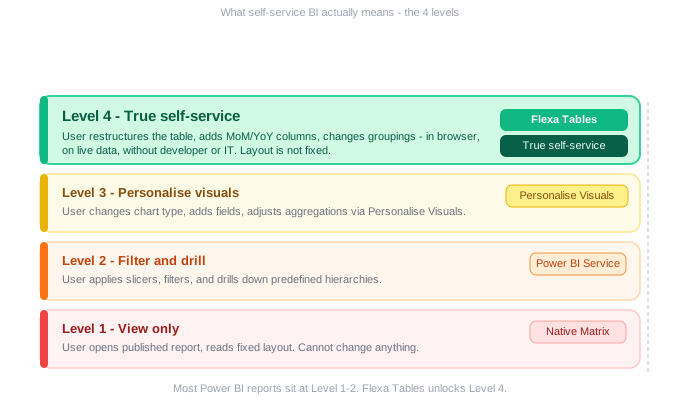
Not all Power BI deployments are equal. Here's a practical framework for understanding how much control end users actually have — from least to most self-service:
The vast majority of Power BI deployments sit at Level 2. Users can filter and drill, but any structural change — adding a column, switching a grouping, adding variance — requires a developer. That's not self-service for the people who need to make decisions.
3. Where the Native Matrix Visual Falls Short
Power BI's Matrix visual is the closest native equivalent to a pivot table. It handles rows, columns, values, hierarchies, and drill-down well. But it has a fundamental architectural constraint:
The Matrix visual layout is defined by the developer and locked after publishing. End users can filter the data — but they cannot change the structure of the table.
This means every structural question an end user has — "can you show this by region instead?", "can you add a variance column?" — requires a developer to open Power BI Desktop, make changes, and republish. For organizations with large user bases, this creates a permanent bottleneck.
| End-user action | Matrix visual | Self-service level |
|---|---|---|
| Apply a slicer or filter | ✅ Yes | Level 2 |
| Drill down a hierarchy | ✅ Yes | Level 2 |
| Change chart type | ⚠️ With Personalise | Level 3 |
| Swap rows and columns | ❌ Impossible | Blocked |
| Add MoM variance column | ❌ Needs DAX | Developer only |
| Regroup dimensions on the fly | ❌ Impossible | Developer only |
4. What True Self-Service Looks Like in Practice
True self-service means a business analyst — with no developer help — can sit down at 8am on a Monday and do any of the following:
- Open the report and restructure the layout for a board presentation — swap rows and columns, change the grouping from department to division, within 2 minutes
- Add a Month-over-Month comparison column to spot what changed since last month — drag to add, done in 10 seconds
- Create a custom view for a specific stakeholder — show only the metrics that matter to the CFO, hide the rest — without affecting what other users see
- Do all of this on live data — no Excel export, no stale numbers, no version confusion
Can a finance analyst add a variance column to a published Power BI report — right now, in their browser — without contacting anyone? If the answer is no, you don't have Level 4 self-service, regardless of what the platform claims.
5. How to Enable Level 4 Self-Service in Power BI
Flexa Tables is a Microsoft-certified Power BI custom visual on AppSource that moves your Power BI deployment from Level 2 to Level 4. It replaces the native Matrix visual in reports where end users need true flexibility.
What changes for end users
Before Flexa Tables
- Open report → see fixed layout
- Want a change → file ticket
- Wait 1–3 days
- Repeat every reporting cycle
After Flexa Tables
- Open report → start with default view
- Want a change → drag and drop
- Done in seconds
- No IT needed, ever
What changes for developers
The developer's role shifts from "fix the layout every time someone asks" to "set up a well-structured data model and default view." That's a one-time investment, not an ongoing maintenance burden. Developers get their time back for higher-value work.
Setup takes under 5 minutes: install from AppSource, add to the report canvas, configure default fields, publish. From that point, end users own the layout.
6. Who Benefits Most
🏦
Finance & FP&A
Analysts who need to reshape P&L, budget vs actual, and variance reports for different audiences — monthly, without IT help.
📈
Sales Operations
Regional managers and sales leaders who need to pivot by territory, product, and period — without waiting for BI team turnaround.
📊
BI Consultants
Consultants who want to deliver genuinely self-service Power BI reports to clients — reducing post-go-live change requests from day one.
Move your Power BI team to Level 4 self-service
Install Flexa Tables from Microsoft AppSource. Free trial, no credit card, set up in under 5 minutes.
Get Free Trial on AppSource →Also read: How End Users Can Restructure Power BI Reports Without Desktop
FAQ
What is self-service analytics in Power BI?
Self-service analytics in Power BI means business users can answer their own data questions without IT or developer involvement. In practice, most Power BI deployments only achieve Level 2 (filtering and drilling). True self-service — Level 4 — means end users can also restructure table layouts, add variance columns, and change groupings in the published report. Flexa Tables enables Level 4.
Is Power BI really self-service?
Power BI is self-service for report builders — analysts who build reports in Power BI Desktop don't need to involve IT. But for report consumers — the end users who view published reports — it's largely not self-service. Layout changes, new columns, and regroupings all require a developer. This is the key distinction most discussions miss.
What is the difference between Power BI Personalise Visuals and true self-service?
Personalise Visuals (Level 3) lets users change chart types, add fields, and adjust aggregations — but it doesn't allow restructuring table layouts, adding variance columns (MoM, YoY), or swapping pivot dimensions. True self-service (Level 4) covers all of those actions and more, which is what Flexa Tables provides.
How do I enable self-service analytics for my Power BI end users?
Install Flexa Tables from Microsoft AppSource, add it to your report as a replacement for the Matrix visual, configure the default field layout, and publish. End users can then drag fields, add variance columns, and restructure the table themselves — no Power BI Desktop, no developer, no tickets needed.
Does enabling self-service mean losing governance?
No. Flexa Tables works within the Power BI governance model — users can only interact with data that the report already has access to. Row-level security, workspace permissions, and dataset access controls all still apply. Self-service layout control doesn't bypass data governance.
Flexa Intel Team
Power BI Custom Visuals — flexaintel.com
We build Microsoft-certified Power BI visuals that close the gap between what Power BI does natively and what analysts and finance teams actually need. Flexa Tables is available on Microsoft AppSource with a 5-star rating.


