
Power bi budget vs actual without it finance guide
Direct Answer
Budget vs actuals in Power BI requires a data model where budget and actuals share a common dimension — typically a Date table and an Account/Category dimension. The most reliable approach is a scenario column model: a single fact table with a "Scenario" column (Actual / Budget / Forecast) rather than separate tables. DAX measures then filter by scenario. For teams who need Finance users to compare periods themselves without developer involvement, Flexa Tables handles variance as a built-in feature — no DAX, no Desktop.
Why Budget vs Actuals Breaks Before You Write Any DAX
Most budget vs actuals problems in Power BI are not DAX problems. They are data model problems. The DAX is straightforward — the difficulty is getting budget and actuals data structured so they can be compared at the same granularity.
The three most common failure modes:
- Budget is monthly, actuals are daily — the two tables can't join directly because the date granularity doesn't match. Budget for January is one row; actuals for January are 20+ rows.
- Budget and actuals are in separate tables with no shared dimension — you can't filter both with one slicer because there's no relationship between them.
- Budget has different account codes than actuals — a budget item "Marketing - Digital" doesn't match the GL code "MKT-001" in the actuals table.
Two Data Model Options
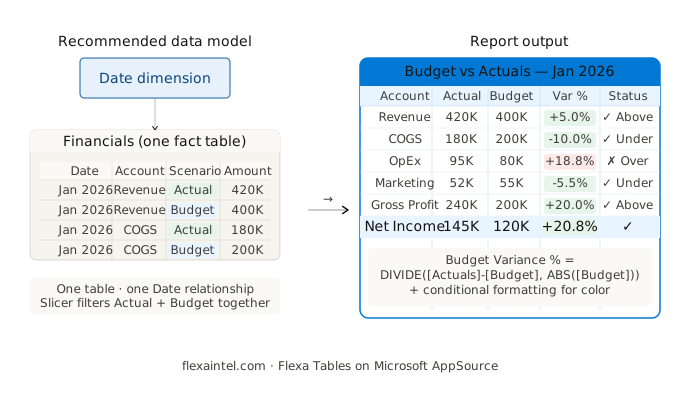
Option A — Scenario column (recommended)
One fact table. A "Scenario" column holds "Actual", "Budget", or "Forecast". Both are filtered via DAX using CALCULATE on that column.
✓ One date table connects everything
✓ Slicers filter both automatically
✓ Easiest to maintain
Option B — Separate tables
Budget and actuals in separate tables, both connected to a shared Date and Account dimension. Common when data comes from different source systems.
⚠ Requires careful relationship setup
⚠ Slicer must be from dimension, not fact
⚠ Budget granularity must be normalized
Option A Setup: Scenario Column Model
Your fact table should look like this — budget and actuals in the same table, distinguished by a Scenario column:
| Date | Account | Scenario | Amount |
|---|---|---|---|
| 2026-01-01 | Revenue | Actual | $420,000 |
| 2026-01-01 | Revenue | Budget | $400,000 |
| 2026-01-01 | Revenue | Forecast | $415,000 |
| 2026-01-01 | COGS | Actual | $180,000 |
If your actuals are at daily granularity and budget is monthly, aggregate actuals to month in Power Query before appending — or use a month-level date key as the join column.
DAX Measures: Copy-Paste Ready
-- Base measures (filter by Scenario column)
Actuals =
CALCULATE(
    SUM('Financials'[Amount]),
    'Financials'[Scenario] = "Actual"
)

Budget =
CALCULATE(
    SUM('Financials'[Amount]),
    'Financials'[Scenario] = "Budget"
)

-- Variance (absolute)
Budget Variance =
IF(
    ISBLANK([Budget]),
    BLANK(),
    [Actuals] - [Budget]
)

-- Variance (percentage)
Budget Variance % =
DIVIDE(
    [Actuals] - [Budget],
    ABS([Budget])
)

-- Actuals vs Forecast
Forecast Variance % =
VAR _forecast = CALCULATE(
    SUM('Financials'[Amount]),
    'Financials'[Scenario] = "Forecast"
)
RETURN DIVIDE([Actuals] - _forecast, ABS(_forecast))
Use ABS([Budget]) in the denominator to handle expense accounts correctly — budget for costs is typically positive, actuals for costs are positive, so variance is negative when over budget. Without ABS, a negative budget (e.g. a provision account) inverts the sign of the percentage.
Option B: Separate Tables — Key Rules
If your budget and actuals come from different systems and cannot be combined into one table, follow these three rules to avoid the most common errors:
- Both tables connect to a shared Date dimension — never join budget directly to actuals. Route both through the same Date table. Your slicer uses Date[Month], which filters both fact tables through the relationship.
- Normalize budget granularity in Power Query — if budget is annual ($1.2M/year for Marketing), divide by 12 in Power Query to create monthly rows before loading. Do not use DAX to allocate budget — it creates performance issues at scale.
- Account codes must match exactly — if budget uses "MKT" and actuals use "Marketing", create a mapping table in Power Query and merge before loading. Mismatched codes silently return blank rather than erroring.
-- With separate tables, measures reference each table directly
Actuals = SUM('ActualsTable'[Amount])
Budget  = SUM('BudgetTable'[Amount])

Budget Variance =
IF(ISBLANK([Budget]), BLANK(), [Actuals] - [Budget])

Budget Variance % =
DIVIDE([Actuals] - [Budget], ABS([Budget]))
The Request That Never Stops
Budget vs actuals reporting has a predictable lifecycle in most organizations:
"Can you add budget vs actuals for Revenue?"
"Same thing but for Margin and COGS too."
"Also Forecast vs Actuals — can that be a different color?"
"Now the CFO wants to compare against last year's actuals too."
"Can Finance do this themselves without asking IT each time?"
That last question is the one that signals a DAX-based approach has hit its ceiling. Each new comparison requires new measures, new columns in the matrix, and another round-trip to Power BI Desktop. For organizations where Finance needs to explore comparisons ad hoc — different periods, different metrics, different scenarios — the DAX maintenance model doesn't scale. See the pattern in full detail at Variance Analysis in Power BI Without DAX.
The No-DAX Option for Finance Teams
Flexa Tables (Microsoft AppSource) adds variance comparison as a built-in feature of the published report. Finance users select which two scenarios or periods to compare — Actual vs Budget, Actual vs Forecast, current month vs prior month — and the variance column appears instantly with absolute value and percentage, color-coded.
What this changes in practice:
- Finance can compare any two periods themselves — no developer ticket, no republish cycle
- No new DAX measures when Finance adds a new metric to the model
- Works with the existing data model — no structural changes required
- Installs from AppSource in under 5 minutes, free trial available
Which Approach to Use
| Your situation | Recommended approach |
|---|---|
| Budget and actuals from same source, can be combined | Scenario column model (Option A) |
| Budget from ERP, actuals from accounting system | Separate tables (Option B), shared Date dimension |
| Fixed 2–3 comparisons, developer-managed report | DAX measures (either model) |
| Finance needs ad hoc comparisons without IT | Flexa Tables |
| 5+ metrics, Actual + Budget + Forecast all needed | Flexa Tables |
Let Finance Compare Budget vs Actuals Themselves
Flexa Tables installs from AppSource in under 5 minutes. Free trial, no credit card required.
Get Free Trial on AppSource →Frequently Asked Questions
How do I create a budget vs actuals report in Power BI?
The recommended approach is a scenario column model: one fact table with a "Scenario" column containing "Actual", "Budget", and "Forecast" values. Connect this to a shared Date dimension. Then create DAX measures using CALCULATE(SUM([Amount]), [Scenario] = "Actual") and similar for Budget. Compute variance as DIVIDE([Actuals] - [Budget], ABS([Budget])).
Why is my budget vs actuals comparison showing blank in Power BI?
The most common cause is mismatched granularity — budget is monthly but actuals are daily, so the date join fails. A second cause is mismatched account codes between the two tables. Check that your date dimension covers both tables at the same grain, and that account/category codes match exactly between budget and actuals before creating the relationship.
Should I put budget and actuals in the same table or separate tables in Power BI?
If your data comes from the same source or can be combined in Power Query, use one table with a Scenario column — simpler to model, easier to maintain. If budget and actuals come from different systems with different schemas, use separate tables connected through a shared Date and Account dimension. Never join budget directly to actuals without a shared dimension.
Can Finance teams compare budget vs actuals without a developer in Power BI?
Not with native Power BI — any new comparison or metric requires a developer to add DAX measures and republish the report. Flexa Tables changes this: Finance users select the two scenarios to compare (Actual vs Budget, Actual vs Forecast, etc.) directly in the published report, and the variance column appears instantly without developer involvement.
How do I show budget vs actuals variance as a percentage in Power BI?
Use DIVIDE([Actuals] - [Budget], ABS([Budget])). Using ABS() on the denominator ensures correct sign behavior when the budget value is negative (common in expense or provision accounts). Format the measure as a percentage in the Format pane and apply conditional formatting for green/red coloring.
Related Reading
→ Variance Analysis in Power BI Without DAX
→ Power BI Pivot Table: Add Excel-Style Pivoting Without DAX
Flexa Intel Team
Power BI Custom Visuals · flexaintel.com
We build Microsoft-certified Power BI visuals that close the gap between what Power BI does natively and what analysts and finance teams actually need. Flexa Tables is available on Microsoft AppSource.


