
Power bi year over year yoy comparison without dax
Direct Answer
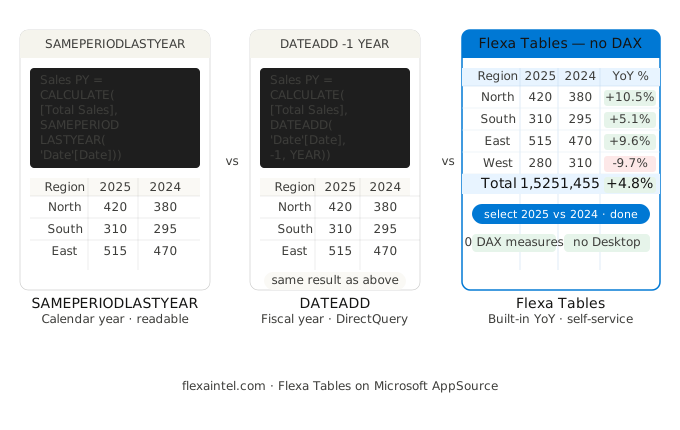
To calculate year over year in Power BI, use either SAMEPERIODLASTYEAR (simpler, full-year context) or DATEADD('Date'[Date], -1, YEAR) (more flexible, same result for most cases). Both require a properly marked date table. For Finance teams who need YoY without writing DAX — or want end-users to toggle it in the published report — Flexa Tables adds YoY as a built-in one-click option.
Two Functions, One Purpose
Power BI has two primary DAX functions for year-over-year comparison. They produce identical results in most standard scenarios — but behave differently at the edges, particularly around partial periods and fiscal year configurations.
Understanding when each breaks — and why — saves hours of debugging when Finance first reports that "the YoY numbers look wrong."
Method 1: SAMEPERIODLASTYEAR
SAMEPERIODLASTYEAR returns the dates from the same period one year earlier. It is the most readable option and the standard starting point for any YoY requirement.
-- Step 1: Prior year value
Sales PY =
CALCULATE(
    [Total Sales],
    SAMEPERIODLASTYEAR('Date'[Date])
)

-- Step 2: YoY percentage
Sales YoY % =
DIVIDE(
    [Total Sales] - [Sales PY],
    ABS([Sales PY])
)

-- Step 3: YoY absolute change
Sales YoY Δ =
IF(
    ISBLANK([Sales PY]),
    BLANK(),
    [Total Sales] - [Sales PY]
)
Always use ABS() on the denominator to handle negative prior-year values correctly — common in P&L reporting where prior year may show a loss.
Method 2: DATEADD with YEAR interval
DATEADD shifts the date context by any interval. Using -1, YEAR produces the same result as SAMEPERIODLASTYEAR in standard scenarios — but it scales: the same pattern works for MoM, QoQ, and YoY by changing the interval.
Sales PY =
CALCULATE(
    [Total Sales],
    DATEADD('Date'[Date], -1, YEAR)
)

Sales YoY % =
DIVIDE(
    [Total Sales] - [Sales PY],
    ABS([Sales PY])
)
Internally, SAMEPERIODLASTYEAR is implemented as DATEADD(dates, -1, YEAR) — they are equivalent for calendar-year models.
SAMEPERIODLASTYEAR vs DATEADD: Key Differences
| Scenario | SAMEPERIODLASTYEAR | DATEADD -1 YEAR |
|---|---|---|
| Standard calendar year YoY | ✓ Identical result | ✓ Identical result |
| YTD vs prior year YTD | ✓ Works cleanly | ✓ Works cleanly |
| End-of-month edge case (Feb 27–28) | ⚠ Extension semantics — extends to end of month | ✓ Shifts exact dates, no extension |
| Fiscal year (e.g. Apr–Mar) | ✕ Always uses calendar year boundaries | ✓ Respects filter context — pair with fiscal date table |
| Reuse for MoM / QoQ | ✕ Year only | ✓ Change to MONTH or QUARTER |
| Code readability | ✓ Self-documenting | ⚠ Slightly more verbose |
| DirectQuery mode | ✕ Not supported in calculated columns/RLS | ✓ Supported |
Rule of thumb: Use SAMEPERIODLASTYEAR for calendar-year models where readability matters. Use DATEADD for fiscal year models, DirectQuery, or when you want one reusable pattern for MoM, QoQ, and YoY.
YTD vs Prior Year YTD: The Pattern Finance Actually Needs
The most common Finance use case is not simply "this month vs same month last year" — it's "year-to-date vs same period last year." A report filtered to June 2026 should show Jan–Jun 2026 vs Jan–Jun 2025, not just June 2026 vs June 2025.
-- Current year YTD
Sales YTD =
CALCULATE(
    [Total Sales],
    DATESYTD('Date'[Date])
)

-- Prior year YTD (same period)
Sales PY YTD =
CALCULATE(
    [Sales YTD],
    SAMEPERIODLASTYEAR('Date'[Date])
)

-- YoY on YTD basis
Sales YTD YoY % =
DIVIDE(
    [Sales YTD] - [Sales PY YTD],
    ABS([Sales PY YTD])
)
For fiscal year ending on a date other than December 31, pass the end date to DATESYTD: DATESYTD('Date'[Date], "3/31") for a March fiscal year end.
The Maintenance Problem at Scale
YoY starts as two measures (prior year value + percentage). In practice it compounds fast:
Typical Finance report
Revenue, Margin, Units, Headcount, COGS = 5 metrics
Comparisons needed
MoM + YoY + YTD vs PY YTD = 3 patterns
Total DAX measures
5 metrics × 3 patterns × 2 (value + %) = 30 measures
When date table changes
All 30 measures require audit and potential rework
The pattern is identical to what we described in Variance Analysis in Power BI Without DAX — DAX works, but maintenance cost grows with every metric and every new comparison period Finance requests.
The No-DAX Option: YoY in the Published Report
If the goal is to give Finance teams self-service YoY comparison without maintaining a stack of DAX measures — or without sending every "can you add YoY for this metric too?" request back to the developer — Flexa Tables handles it as a built-in feature.
How end-users add YoY in Flexa Tables:
- Open the published report in Power BI Service — no Desktop access needed
- Click the variance button in Flexa Tables
- Select the two periods to compare (e.g. Jan–Dec 2025 vs Jan–Dec 2024)
- YoY column appears instantly — absolute change and percentage, color-coded green/red
The same interface handles DoD and MoM — no additional measures, no developer in the loop for new comparison requests. Works with the existing data model, installs from AppSource in under 5 minutes.
Which Method to Use
| Your situation | Best method |
|---|---|
| Calendar year, simple model, readable code | SAMEPERIODLASTYEAR |
| Fiscal year or DirectQuery mode | DATEADD -1 YEAR |
| Need MoM + YoY from same pattern | DATEADD (change interval) |
| YTD vs prior year YTD | DATESYTD + SAMEPERIODLASTYEAR |
| Finance team needs self-service YoY | Flexa Tables |
| 5+ metrics, DoD + MoM + YoY all needed | Flexa Tables |
Add YoY Variance Without Writing DAX
Flexa Tables installs from AppSource in under 5 minutes. Free trial, no credit card required.
Get Free Trial on AppSource →Frequently Asked Questions
How do I calculate year over year in Power BI?
Use CALCULATE([Measure], SAMEPERIODLASTYEAR('Date'[Date])) to get the prior year value, then DIVIDE([Current] - [PriorYear], ABS([PriorYear])) for the percentage. Alternatively, DATEADD('Date'[Date], -1, YEAR) produces the same result and scales to other intervals. For no-DAX YoY in the published report, Flexa Tables adds it as a one-click built-in option.
What is the difference between SAMEPERIODLASTYEAR and DATEADD in Power BI?
SAMEPERIODLASTYEAR is a shorthand for DATEADD(dates, -1, YEAR) — they produce the same result in calendar year models. Key differences: SAMEPERIODLASTYEAR has end-of-month extension semantics for Feb 27–28; it does not work in DirectQuery calculated columns; it only operates at YEAR granularity. DATEADD is more flexible: it works in DirectQuery, supports any interval (DAY, MONTH, QUARTER, YEAR), and behaves consistently at month boundaries.
Why is my YoY calculation showing blank in Power BI?
The most common cause is that your date table does not cover the prior year — if your data starts January 2024, there is no January 2023 to compare to, so the first year of data always returns blank for YoY. Verify your date table spans at least two full years before the earliest fact date. Also check the date table is marked as a date table in Power BI Desktop, and that it contains every calendar day without gaps.
How do I calculate YTD vs prior year YTD in Power BI?
Wrap your YTD measure inside SAMEPERIODLASTYEAR: Sales PY YTD = CALCULATE([Sales YTD], SAMEPERIODLASTYEAR('Date'[Date])). This returns the YTD total for the same period in the prior year — so if the current filter context is Jan–Jun 2026, it returns Jan–Jun 2025.
Can I do YoY in Power BI without DAX?
Yes. Flexa Tables (Microsoft AppSource) adds DoD, MoM, and YoY as built-in options in the published report. End-users select the two periods to compare and the variance column appears instantly — no DAX measures, no Power BI Desktop access needed. See the full walkthrough at Variance Analysis in Power BI Without DAX.
Related Reading
→ Variance Analysis in Power BI Without DAX
→ Power BI Pivot Table: Add Excel-Style Pivoting Without DAX
→ Power BI Month Over Month: 3 Ways to Calculate MoM
→ SAMEPERIODLASTYEAR vs DATEADD: Full Differences Guide
Flexa Intel Team
Power BI Custom Visuals · flexaintel.com
We build Microsoft-certified Power BI visuals that close the gap between what Power BI does natively and what analysts and finance teams actually need. Flexa Tables is available on Microsoft AppSource.


