
Power bi month over month mom comparison without dax
Direct Answer
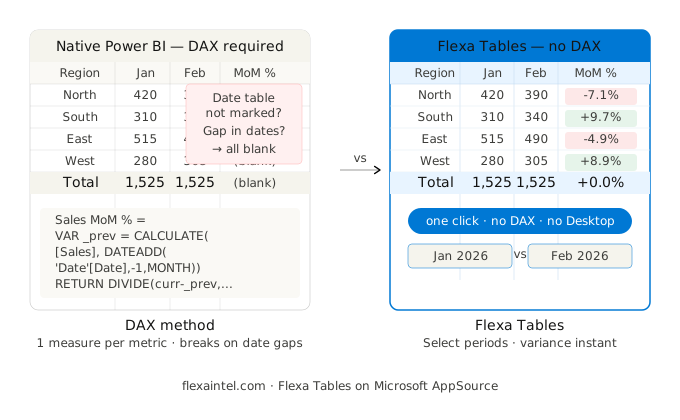
To calculate month over month in Power BI natively, use DATEADD('Date'[Date], -1, MONTH) inside a CALCULATE measure. You need a separate measure per metric. For teams that need MoM variance without writing DAX — or want end-users to add it themselves in the published report — Flexa Tables adds MoM as a one-click button with no measures required.
Why MoM in Power BI Is More Work Than It Should Be
Month over month comparison is one of the most requested Finance and Operations metrics. It's also one of the most commonly broken ones in Power BI.
The core problem: Power BI's DAX time intelligence functions require a properly structured date table — a continuous, unbroken sequence of dates with no gaps — connected to your fact table. When that setup is off, MoM measures return blank or wrong values across entire months. Most debugging time goes into the date table, not the measure itself.
This article covers three approaches — from standard DAX to no-DAX at all — so you can pick the one that fits your situation.
Before You Write Any DAX: Check Your Date Table
⚠ 90% of blank MoM values come from a broken date table, not a broken measure. Verify these two things before writing any DAX.
Two checks that prevent most issues:
- Continuous date range: Your date table must contain every calendar day from the earliest to the latest date in your fact table — no gaps. If January has 31 days but your date table only has transaction days, DATEADD will return blank for days with no data.
- Mark as date table: In Power BI Desktop, right-click your date table → Mark as date table → select the date column. This disables the auto date hierarchy and tells DAX time intelligence which column to use.
Once those two are confirmed, any of the three methods below will work reliably.
Method 1: DATEADD (Standard, Most Flexible)
DATEADD shifts the date context by a specified interval. It works with any granularity — day, month, quarter, year — making it the most reusable pattern for time comparisons.
Sales MoM % =
VAR _curr = [Total Sales]
VAR _prev = CALCULATE(
    [Total Sales],
    DATEADD('Date'[Date], -1, MONTH)
)
RETURN
    IF(
        ISBLANK(_prev) || _prev = 0,
        BLANK(),
        DIVIDE(_curr - _prev, ABS(_prev))
    )
Use ABS(_prev) in the denominator to handle sign correctly when the prior month was negative (e.g. a loss).
To show absolute MoM change (not percentage):
Sales MoM Δ =
VAR _curr = [Total Sales]
VAR _prev = CALCULATE(
    [Total Sales],
    DATEADD('Date'[Date], -1, MONTH)
)
RETURN IF(ISBLANK(_prev), BLANK(), _curr - _prev)
Limitation: You need to duplicate this pattern for every metric. Five metrics = ten measures (one for value, one for %). When Finance adds a new KPI, you go back to Desktop to add two more measures.
Method 2: PREVIOUSMONTH (Simpler, Less Flexible)
PREVIOUSMONTH returns the full prior calendar month. Cleaner to write, but less flexible — it always returns a complete month, which breaks Month-to-Date comparisons.
Sales Prev Month =
CALCULATE(
    [Total Sales],
    PREVIOUSMONTH('Date'[Date])
)

Sales MoM % =
DIVIDE(
    [Total Sales] - [Sales Prev Month],
    ABS([Sales Prev Month])
)
Use this when you always compare full months. Avoid it for MTD vs LMTD comparisons — use DATEADD instead.
Common issue with PREVIOUSMONTH: If your visual shows a blank in the last column of a matrix, it's usually because the current incomplete month has no "previous" to compare to at the total level. Fix by adding IF(ISBLANK([Sales Prev Month]), BLANK(), ...) around the calculation.
DATEADD vs PREVIOUSMONTH: When to Use Which
| Scenario | DATEADD | PREVIOUSMONTH |
|---|---|---|
| Full month vs full month | ✓ Works | ✓ Works |
| MTD vs same days last month | ✓ Works | ✕ Returns full prior month |
| Quarter or year comparison | ✓ Change interval to QUARTER/YEAR | ✕ Month only |
| Code readability | ⚠ Slightly more verbose | ✓ Cleaner |
| Reuse for YoY / DoD | ✓ Same pattern, change interval | ✕ Need separate functions |
The Problem That Gets Worse Over Time
Both DAX methods work. The issue isn't correctness — it's maintenance at scale.
Month 1 — 2 metrics
Sales MoM %, Revenue MoM %
4 measures total
Month 6 — Finance adds 3 more
+ Margin %, Headcount, Units
10 measures total
Month 12 — also need YoY
Same 5 metrics × MoM + YoY
20 measures total
Date table changes
All 20 measures potentially break
Full audit required
This is the pattern most Power BI developers recognize: MoM DAX starts simple and becomes a maintenance burden as the report grows. See the full breakdown in Variance Analysis in Power BI Without DAX.
Method 3: No DAX — Built-In MoM in the Published Report
If the goal is to give Finance teams MoM variance they can use and modify themselves — without going back to Desktop for every new metric — Flexa Tables handles it as a built-in feature.
How it works:
- Install Flexa Tables from Microsoft AppSource (free trial, under 5 minutes)
- Add to your existing report canvas — no changes to your data model
- Publish to Power BI Service
- End-users click the variance button, select two months to compare, MoM column appears instantly — absolute value and % change, color-coded
No DAX measures, no Desktop access needed, no developer in the loop for every new comparison request. Works for DoD and YoY with the same interface.
Which Method to Use
| Your situation | Best method |
|---|---|
| 1–3 metrics, stable report, developer-managed | DATEADD |
| Full month comparison only, simple model | PREVIOUSMONTH |
| 5+ metrics, Finance team needs self-service | Flexa Tables |
| End-users add MoM without developer | Flexa Tables |
| Need DoD + MoM + YoY on same report | Flexa Tables |
Add MoM Variance Without Writing DAX
Flexa Tables installs from AppSource in under 5 minutes. Free trial, no credit card required.
Get Free Trial on AppSource →Frequently Asked Questions
How do I calculate month over month in Power BI?
Use DATEADD('Date'[Date], -1, MONTH) inside a CALCULATE measure to get the prior month's value. Then use DIVIDE([Current] - [PrevMonth], ABS([PrevMonth])) for the percentage. Alternatively, Flexa Tables adds MoM as a built-in button in the published report — no DAX required.
Why is my MoM calculation returning blank in Power BI?
The most common cause is a date table that is not continuous — missing dates between the earliest and latest values. A second cause is the date table not being marked as a date table in Power BI Desktop. Check both before debugging the measure itself. Also wrap your return value in IF(ISBLANK(_prev), BLANK(), ...) to suppress blank for the first month in your data.
What is the difference between DATEADD and PREVIOUSMONTH in DAX?
DATEADD shifts the date context by any interval (day, month, quarter, year) and preserves the current selection granularity — useful for MTD vs prior MTD. PREVIOUSMONTH always returns the complete prior calendar month, regardless of the current selection — simpler for full-month comparisons but breaks when comparing partial months.
Can I do MoM in Power BI without DAX?
Yes. Flexa Tables (Microsoft AppSource) adds DoD, MoM, and YoY variance as built-in options in the published report. End-users select the two periods to compare and the variance column appears — no DAX measures, no Power BI Desktop access needed.
How do I show MoM percentage change in a Power BI matrix?
Create a DAX measure using DATEADD to get the prior month value, then divide the difference by the absolute prior value: DIVIDE([Curr] - [Prev], ABS([Prev])). Add the measure to your Matrix visual's Values field. Format the column as percentage. For color coding (green/red), apply conditional formatting on that column in the Format pane.
Related Reading
→ Variance Analysis in Power BI Without DAX
→ Power BI Pivot Table: Add Excel-Style Pivoting Without DAX
→ Power BI Matrix vs Table: When to Use Each
→ Power BI Year Over Year (YoY) Without DAX
Flexa Intel Team
Power BI Custom Visuals · flexaintel.com
We build Microsoft-certified Power BI visuals that close the gap between what Power BI does natively and what analysts and finance teams actually need. Flexa Tables is available on Microsoft AppSource.


