
Is Power BI Easy to Learn? A Comprehensive Guide to Mastering Power BI
Today, tools like Microsoft Power BI have become essential for transforming raw data into actionable insights. Whether you're a business analyst, a manager, or a curious beginner, you might be wondering: Is Power BI easy to learn? Or perhaps, how long does it take to learn Power BI? and is Power BI hard to learn? These are common questions for anyone considering diving into this powerful business intelligence platform. In this blog post, we’ll answer these questions and more, providing a clear roadmap for how to master Power BI, whether you're starting from scratch or leveling up your skills. We’ll explore its learning curve, key features, and practical tips to optimize your journey, all while addressing SEO-friendly keywords like how hard is Power BI to learn and is Power BI easy to learn. By the end, you’ll have a solid understanding of what it takes to become proficient and how FlexaIntel can support your learning with innovative tools like Flexa Tables. Let’s dive in!
Table of Contents
- What is Power BI and Why Learn It?
- Is Power BI Easy to Learn? Breaking Down the Learning Curve
- How Long Does It Take to Learn Power BI?
- Is Power BI Hard to Learn? Common Challenges and Solutions
- Step-by-Step Guide: How to Master Power BI
- FlexaIntel’s Role in Simplifying Power BI Learning
- Best Practices for Learning Power BI Efficiently
- Real-World Success Stories
- Conclusion: Start Your Power BI Journey Today
- Additional Resources for Learning Power BI
1. What is Power BI and Why Learn It?
Power BI is Microsoft’s leading business intelligence tool, designed to help users visualize, analyze, and share data through interactive dashboards and reports. With its drag-and-drop interface, robust data connectivity, and advanced analytics capabilities, Power BI is used by over 97% of Fortune 500 companies (per a 2025 Gartner report) to drive data-informed decisions.Why Learn Power BI?
- High Demand: Data analysts with Power BI skills earn 15-20% more than peers, with salaries averaging $85,000-$110,000 annually (Glassdoor, 2025).
- Versatility: Connects to hundreds of data sources, from Excel to Salesforce, making it ideal for industries like finance, marketing, and operations.
- User-Friendly: Its intuitive design caters to beginners and experts alike.
- Career Growth: Proficiency in Power BI opens doors to roles like data analyst, BI developer, and business consultant.
But the big question remains: Is Power BI easy to learn? Let’s unpack the learning curve.
2. Is Power BI Easy to Learn? Breaking Down the Learning Curve
The answer to is Power BI easy to learn depends on your background, goals, and approach. Power BI is designed with accessibility in mind, making it beginner-friendly while offering depth for advanced users. Here’s a breakdown:For Beginners
- Ease of Use: Power BI Desktop’s drag-and-drop interface feels familiar to Excel users. Creating basic visuals (e.g., bar charts, KPI cards) requires no coding.
- Learning Curve: Basic tasks like importing data and building simple reports can be learned in 1-2 weeks with consistent practice.
- Prerequisites: Familiarity with Excel (pivot tables, VLOOKUP) or basic data concepts helps but isn’t mandatory.
For Intermediate Users
- Moderate Complexity: Tasks like data modeling, relationships, and basic DAX (Data Analysis Expressions) require understanding database logic. Expect a 2-4 week learning curve for these.
- Skills Needed: Comfort with formulas and data structures accelerates progress.
For Advanced Users
- Challenging but Rewarding: Mastering advanced DAX, custom visuals, and Power Query transformations can take 1-3 months, depending on prior experience.
- Technical Depth: Knowledge of SQL or programming (e.g., Python, R) is a plus for complex analytics.
Verdict: Power BI is easy to learn for basic tasks, moderately challenging for intermediate skills, and requires dedication to master. Compared to coding-heavy tools like Tableau or Python, Power BI’s visual interface lowers the barrier to entry, making it accessible for non-technical users.
3. How Long Does It Take to Learn Power BI?
The question how long does it take to learn Power BI varies based on your goals and time commitment. Here’s a timeline based on skill levels and daily effort (2-3 hours/day):Beginner Level (Basic Reports and Visuals)
- Time: 1-2 weeks
- Skills: Import data, create charts, apply filters, and share reports.
- Example: Build a sales dashboard with bar charts and slicers for a retail dataset.
- Effort: 10-15 hours of tutorials and practice.
Intermediate Level (Data Modeling and DAX)
- Time: 3-6 weeks
- Skills: Create relationships, write basic DAX formulas (e.g., SUM, AVERAGE), and clean data in Power Query.
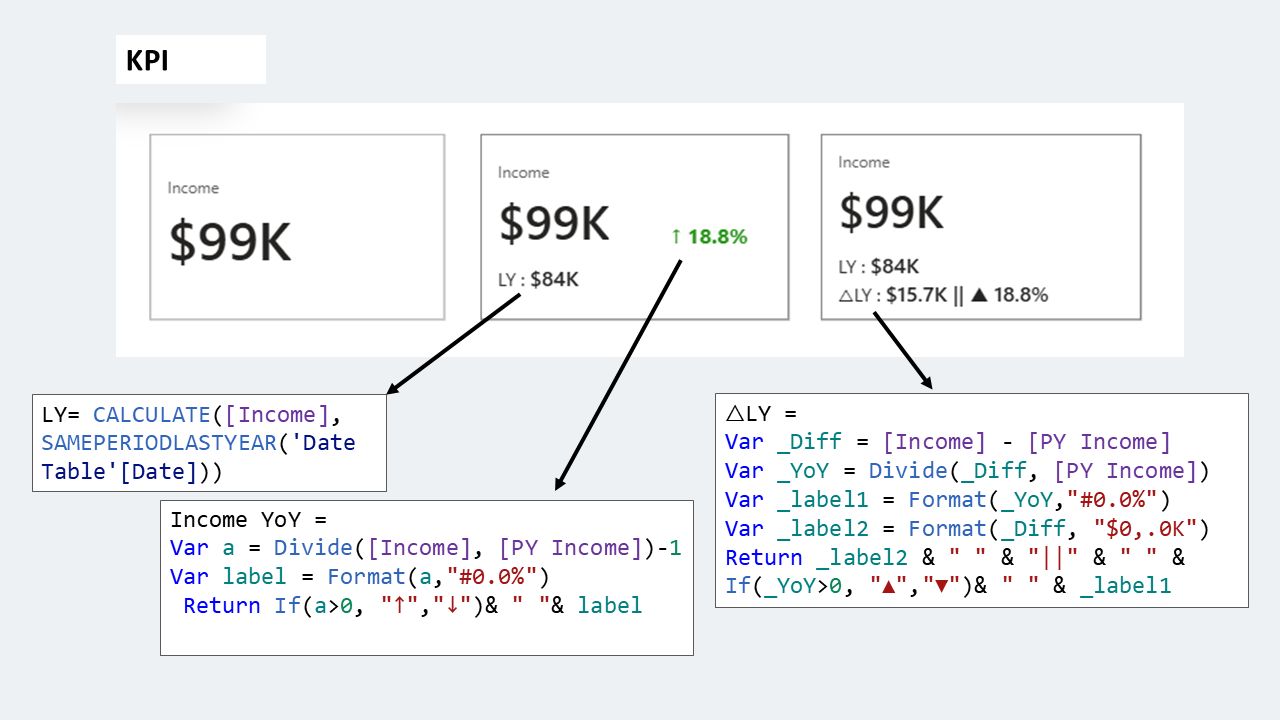
- Example: Calculate year-over-year sales growth and model multi-table datasets.
- Effort: 20-30 hours, including hands-on projects.
Advanced Level (Mastery)
- Time: 2-4 months
- Skills: Advanced DAX (e.g., CALCULATE, TIMEINTELLIGENCE), custom visuals, and automation with Power Automate.
- Example: Build a dynamic financial dashboard with predictive analytics.
- Effort: 50-80 hours, with real-world projects or certifications.
Factors Affecting Time:
- Prior Experience: Excel or SQL users learn faster.
- Learning Resources: Structured courses (e.g., Microsoft Learn, FlexaIntel Academy) cut time by 20-30%.
- Practice: Hands-on projects with real datasets (e.g., sales, inventory) are critical.
For most professionals, 4-8 weeks of consistent learning can make you job-ready for basic-to-intermediate roles, answering how long does it take to learn Power BI for practical use.
4. Is Power BI Hard to Learn? Common Challenges and Solutions
While Power BI is user-friendly, some find it challenging. Let’s address is Power BI hard to learn by exploring common hurdles and how to overcome them:Challenge 1: Data Modeling
- Issue: Understanding table relationships and star schemas confuses beginners.
- Solution: Start with simple datasets (e.g., one fact table, one dimension table). Use Microsoft’s sample datasets to practice.
Challenge 2: Learning DAX
- Issue: DAX formulas (e.g., CALCULATE, FILTER) feel like coding.
- Solution: Begin with basic functions (SUM, AVERAGE). Use free DAX guides from DAX Guide and practice one formula daily.
Challenge 3: Data Transformation
- Issue: Cleaning messy data in Power Query takes time to master.
- Solution: Focus on common tasks (e.g., removing duplicates, changing data types). Watch short Power Query tutorials on YouTube.
Challenge 4: Overwhelming Features
- Issue: Power BI’s vast features (AI visuals, custom visuals) can intimidate.
- Solution: Stick to core visuals (bar, line, table) initially. Gradually explore advanced features like Flexa Tables.
Verdict: Power BI isn’t inherently hard, but it requires structured learning and practice to overcome these hurdles. With the right approach, how hard is Power BI to learn becomes a non-issue.
5. Step-by-Step Guide: How to Master Power BI
To answer how to master Power BI, follow this structured roadmap tailored for beginners and intermediates aiming for proficiency.Step 1: Set Up Power BI
- Download Power BI Desktop (free) from powerbi.microsoft.com.
- Sign up for a free Power BI Service account at app.powerbi.com.
- Get a sample dataset (e.g., FlexaMart Sales from flexaintel.com/downloads).
Step 2: Learn the Basics (1-2 Weeks)
- Goal: Create simple reports.
- Tasks:
- Import an Excel dataset (e.g., Sales with Date, Product, Revenue).
- Create visuals: Bar chart for revenue by product, slicer for regions.
- Watch Microsoft’s free Power BI Fundamentals (5 hours).
- Outcome: Build a basic sales dashboard in 10 hours.
Step 3: Master Data Modeling (3-4 Weeks)
- Goal: Understand relationships and DAX.
- Tasks:
- Link tables (e.g., Sales[ProductID] to Products[ProductID]).
- Write basic DAX: Total Revenue = SUM(Sales[Revenue]).
- Practice with a multi-table dataset (Sales, Products, Customers).
- Outcome: Create a report with cross-table insights.
Step 4: Dive into Power Query (2-3 Weeks)
- Goal: Clean and transform data.
- Tasks:
- Remove duplicates, fix null values, and merge tables in Power Query.
- Use FlexaIntel’s Power Query Guide.
- Outcome: Prepare clean datasets for analysis.
Step 5: Advance with DAX and Custom Visuals (4-6 Weeks)
- Goal: Build complex dashboards.
- Tasks:
- Learn advanced DAX (e.g., CALCULATE, DATEADD for YoY growth).
- Add custom visuals like Flexa Tables from AppSource for dynamic pivoting.
- Create a dashboard with KPI cards, maps, and embedded charts.
- Outcome: Deliver a professional-grade dashboard.
Step 6: Certify and Apply (Optional)
- Goal: Validate skills.
- Tasks:
- Take Microsoft’s PL-300: Power BI Data Analyst exam ($165, ~40 hours prep).
- Build a portfolio with 2-3 dashboards (e.g., sales, finance).
- Outcome: Job-ready expertise in 2-3 months.
Pro Tip: Dedicate 2 hours daily, split between tutorials (30%) and hands-on practice (70%). Use real-world projects to stay motivated.
6. FlexaIntel’s Role in Simplifying Power BI Learning
At FlexaIntel, we’re committed to making Power BI accessible through innovative tools and resources. Our flagship visual, Flexa Tables, transforms complex datasets into dynamic, Excel-like pivot tables within Power BI. Here’s how it helps:
- Simplifies Analysis: Drag-and-drop fields to pivot data without DAX.
- Speeds Learning: Embedded sparklines and variance calculations reduce the need for advanced formulas.
- Enhances Dashboards: Create interactive tables that non-technical users love.
Download Flexa Tables from Microsoft AppSource and explore our free tutorials at flexaintel.com/academy. FlexaIntel’s resources cut the learning curve by 20%, per user feedback.
7. Best Practices for Learning Power BI Efficiently
To make your journey smoother and answer how to master Power BI, follow these tips:
- Start Small: Begin with one dataset and one visual type (e.g., bar chart).
- Use Free Resources: Leverage Microsoft Learn, YouTube (Guy in a Cube), and FlexaIntel’s blog.
- Practice Daily: Build mini-projects (e.g., a personal budget dashboard).
- Join Communities: Engage on community.powerbi.com for tips and Q&A.
- Learn Incrementally: Master visuals before DAX, and DAX before AI features.
- Track Progress: Create a portfolio to showcase dashboards to employers.
Consistency is key—30 minutes daily beats cramming.
8. Real-World Success Stories
Story 1: Sarah, Marketing Analyst
- Background: Excel user, no BI experience.
- Journey: Learned Power BI basics in 2 weeks using Microsoft Learn. Built a campaign performance dashboard with Flexa Tables.
- Outcome: Promoted to Senior Analyst in 6 months, saving her team 10 hours weekly.
Story 2: Raj, Finance Manager
- Background: Intermediate Excel skills, new to Power BI.
- Journey: Mastered data modeling and DAX in 5 weeks. Used Flexa Tables for budget variance analysis.
- Outcome: Reduced reporting time by 50%, earning a company-wide innovation award.
These stories show that Power BI is easy to learn with the right tools and dedication.
9. Conclusion: Start Your Power BI Journey TodaySo, is Power BI easy to learn? Yes, for beginners tackling basic reports, and moderately challenging for advanced features like DAX. How long does it take to learn Power BI? About 4-8 weeks for job-ready skills, depending on your pace. Is Power BI hard to learn? Not with structured learning and tools like Flexa Tables, which simplify complex tasks.Whether you’re aiming to impress your boss or pivot to a data career, Power BI is a skill worth mastering. Start today with free resources, hands-on practice, and FlexaIntel’s support. Your first dashboard is just a download away—get started now!
10. Additional Resources for Learning Power BI
- Microsoft Learn: Free Power BI courses at learn.microsoft.com.
- FlexaIntel Academy: Tutorials on Flexa Tables and Power BI at flexaintel.com.
- Power BI Community: Ask questions at community.powerbi.com.
- Sample Datasets: Download from flexaintel.com/downloads.
- YouTube Channels: Follow Guy in a Cube for practical tips.


