
How to Become a Power BI Template Creator: Build PBIX Files That Sell (2026)
The fastest path to your first selling template: pick an industry you know well, build a dashboard with Excel-based sample data, take a clean full-screen screenshot, and submit to partner.flexaintel.com. Sales dashboards and operations dashboards are the highest-demand categories. Keep the data model simple — star schema, Excel source, generic column names buyers can map to their own data in 30 minutes.
Becoming a Power BI template creator doesn't require building something from scratch. Every developer who has built reports for clients already has raw material. The skill gap between "dashboard I built for a client" and "dashboard someone will pay $10–$18 for" is mostly about packaging, not ability.
This guide covers what the market actually wants, how to structure your data model for buyers, how to price, and how to write a title and description that gets discovered.
Which Categories Sell Best
Based on the Flexa Intel gallery — 86+ templates across 14 categories with real download data:
| Category | Templates in gallery | Demand level | Why |
|---|---|---|---|
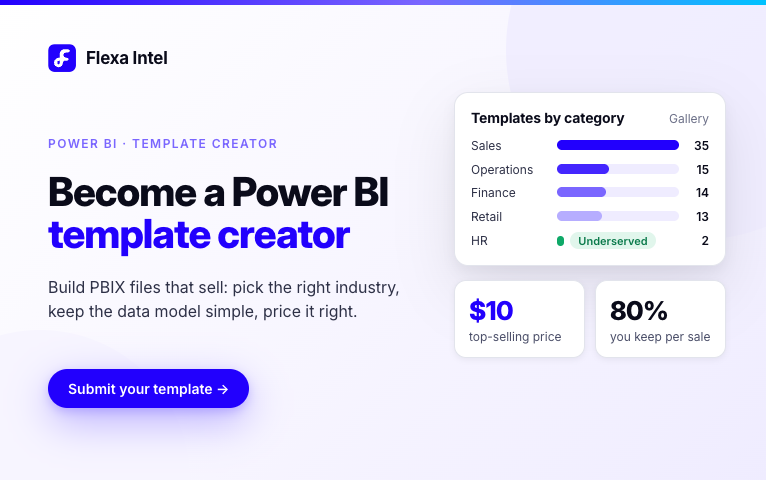
| Sales & Revenue | 35 | High | Every company has a sales team. Most searched keyword segment in Power BI templates. |
| Operations & Production | 15 | High | Manufacturing and logistics companies need these but few developers specialize here — less competition. |
| Retail & E-commerce | 13 | High | E-commerce operators are technically comfortable and willing to pay for ready-made reports. |
| Finance & Accounting | 14 | High | Finance teams search for templates constantly — budget vs actuals, P&L, cash flow. |
| Supply Chain & Logistics | 5 | Medium | Lower volume but high purchase intent — buyers who find a good supply chain template tend to buy immediately. |
| Human Resources | 2 | Medium | Underserved — only 2 templates in the gallery. HR teams increasingly use Power BI for people analytics. |
| Marketing | 5 | Medium | Marketing dashboards compete with native Google Analytics and Meta dashboards — buyers are selective. |
Biggest opportunity right now: HR is almost completely underserved — only 2 templates in the gallery despite significant search demand for "power bi hr dashboard template". Operations and supply chain are also less competitive than sales.
What Sells vs What Doesn't
- Industry-specific with a clear use case
- Excel-based data source (easy to swap)
- Sample data that loads immediately on open
- Multiple pages (overview + detail + drill)
- Includes a data setup guide page
- Title names exactly what's in the report
- MoM or YoY comparison visible on main page
- Generic "company overview" with no industry
- SQL Server or cloud connector as primary source
- No sample data — buyer sees blank panels
- Single-page dashboard only
- No documentation on connecting own data
- Title is vague: "Sales Dashboard"
- Native Matrix only — no variance or comparison
How to Structure Your Data Model for Buyers
The biggest friction point for buyers is connecting their own data. If they can't figure it out in 30 minutes, they'll leave a bad review or ask for a refund. A simple, well-documented model eliminates this.
The recommended structure
- 1
One fact table, 2–4 dimension tables, all Excel files. Keep all Excel files in the same folder as the PBIX. Name the folder "Data" and document the path clearly so buyers know where to put their own files.
- 2
Use generic, descriptive column names. Instead of "Cust_ID" or "Rev_Q1_Actual", use "Customer ID" and "Revenue". Buyers map your column names to their own data — generic names are easier to match than internal abbreviations.
- 3
Add a "Data Setup" page inside the PBIX. A text box or table listing: what each Excel file contains, what column names are required, what data types each column should be (date, text, number), and what to do if their column names differ from yours.
- 4
Test with a fresh Power BI Desktop install. Before submitting, open the PBIX on a machine that has never seen the file. Confirm all visuals load, all connections resolve, and the sample data is visible without any manual steps.
Pre-submission checklist
- All Excel source files are in a "Data" subfolder relative to the PBIX
- No client data anywhere in the file — only fictional sample data
- Data Setup page explains column names and data types
- Main dashboard page fully populated with sample data
- All measures work correctly (no blank cards or error visuals)
- File opens correctly without prompting for credentials
- File size is reasonable — under 50MB preferred
How to Price Your Template
The most downloaded paid templates on Flexa Intel are priced at $10. This is the sweet spot — low enough that buyers don't deliberate long, high enough to signal quality over a free template. Price above $18 only if your template is genuinely more comprehensive than everything else in the category.
Free + paid strategy: Upload one free template per category you work in. Free templates with 50+ downloads signal credibility to buyers considering your paid templates. The download count is visible in the gallery — it's social proof.
Writing Titles and Descriptions That Get Found
Your template title is the most important field. It determines whether buyers find your template in the gallery and whether Google indexes it for relevant searches.
Title formula that works
Power BI [Industry] Dashboard [Template] — [Key Feature 1], [Key Feature 2], [Key Feature 3]
Bad: "Sales Dashboard Template"
Good: "Power BI Sales Dashboard Template — Regional Revenue, YoY Comparison, Rep Performance Tracking"
Bad: "Finance Report"
Good: "Power BI Financial Performance Dashboard — P&L, Budget vs Actuals, Department Variance"
Description must-haves
- First sentence: what industry and what specific problem the template solves
- List of pages included (e.g., "Includes: Executive Overview, Regional Breakdown, Rep Drill-Down")
- Data source type: "Uses Excel files — connect your own data in under 30 minutes"
- Key metrics visible (e.g., "Shows: Revenue, Units Sold, Margin %, MoM Change, YoY Change")
- What the buyer gets: PBIX file + Excel sample data files + Data Setup guide
Submit Your First Template
The Flexa Intel gallery currently has 86+ templates and is actively recruiting creators across all categories. Early submissions get prominent placement and better visibility as the library grows.
Ready to Submit Your First Template?
Pick an industry, build a clean dashboard with Excel sample data, take a screenshot.
You keep 80% of every sale. No monthly fees, no exclusivity required.
Submit Your Template →Frequently Asked Questions
How do I become a Power BI template creator?
Pick an industry you know, build a dashboard with Excel sample data, take a clean screenshot, and submit to partner.flexaintel.com. First template takes 2–4 hours. Most are approved within 48 hours and go live in the Flexa Intel gallery.
Which Power BI template categories sell the most?
Sales & Revenue has the highest search volume. Operations & Production and Finance & Accounting have strong demand with less competition. HR is significantly underserved — only 2 templates in the gallery despite strong search demand for "power bi hr dashboard template."
Should I offer free or paid Power BI templates?
Both. Free templates build download count and credibility. A common approach: one free template per category as a sampler, paid templates at $10–$18 for more complete builds. Templates with 50+ downloads convert better than templates with zero downloads even when quality is similar.
How should I structure the data model in a Power BI template for sale?
Star schema, one fact table, 2–4 dimension tables, all connected to Excel files in a "Data" subfolder. Use generic column names (Date, Product, Region, Revenue). Add a Data Setup page inside the PBIX explaining what columns are needed and what data types to use.
What price should I charge for a Power BI template?
Free for single-page basics, $7–$10 for 2–3 page reports with variance, $15–$18 for multi-page executive or finance dashboards with full documentation. The $10 price point has the most buyers on Flexa Intel.


