
Power BI HR Analytics Dashboard Template (Free PBIX Download)
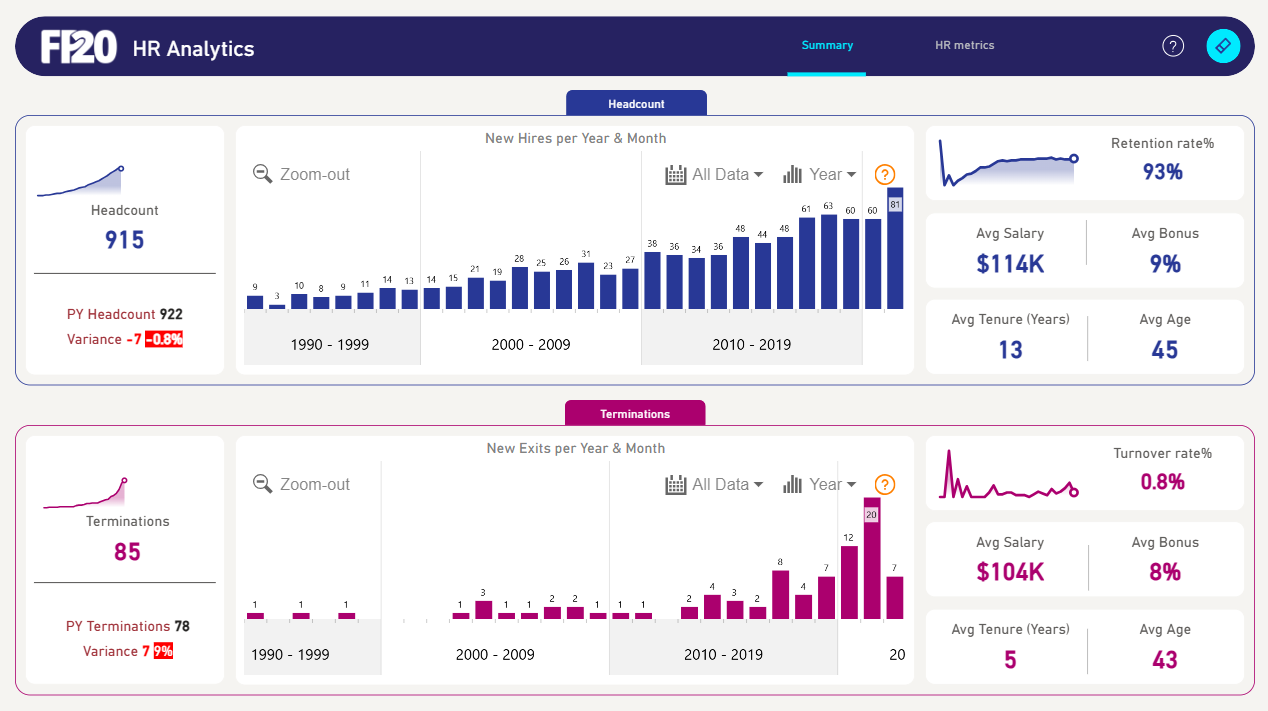
Introduction: This Power BI HR Analytics dashboard gives HR managers and People Analytics teams a 30-year view of workforce movement — from hiring acceleration to termination spikes — alongside current workforce health metrics like retention rate, average salary, tenure, and age. Built as a two-section Summary page with a separate HR Metrics tab, it covers both historical trends and present-state workforce composition in one report.
What's Inside This Template
Section 1 — Headcount
Summary KPIs (left card):
- Current headcount: 915
- Prior year headcount: 922
- Variance: -7 (-0.8%) — marginal net reduction, the organization is in a near-stable headcount state
New Hires per Year & Month (bar chart, 1990–2019): Three decades of hiring history reveal a clear growth trajectory:
- 1990–1999: Flat, low-volume hiring — 3 to 15 hires per year, typical of an early-stage or slow-growth organization
- 2000–2009: Gradual ramp — 14 to 31 hires per year, consistent expansion phase
- 2010–2019: Sharp acceleration — peaks at 81 hires in the most recent year, with consistent 60+ hire years from 2016 onward
The trend confirms the organization shifted from steady-state to aggressive hiring in the 2010s decade, nearly tripling annual hire volume compared to the 2000s average.
Workforce Health KPIs (right card):
- Retention Rate: 93% — strong; industry benchmark for mid-large organizations typically sits at 85–90%, so 93% is above average
- Avg Salary: $114K — indicates a professional/knowledge-worker workforce, not entry-level labor
- Avg Bonus: 9% — moderate performance-linked compensation, typical of corporate white-collar roles
- Avg Tenure: 13 years — exceptionally high; suggests a loyal, experienced workforce with low voluntary attrition
- Avg Age: 45 — a mature workforce, which correlates with the 13-year tenure; this organization has retained people hired in their early 30s
Section 2 — Terminations
Summary KPIs (left card):
- Current year terminations: 85
- Prior year terminations: 78
- Variance: +7 (+9%) — terminations are rising YoY at a rate that warrants monitoring, even though absolute turnover rate remains low
New Exits per Year & Month (bar chart, 1990–2019):
- 1990–1999: Near-zero exits — 0 to 1 per year, consistent with a small or early-stage organization
- 2000–2009: Minimal, stable exits — 1 to 3 per year
- 2010–2019: Sharp spike — peaks at 20 exits in a single year, with 12 and 7 in adjacent years
The spike in exits in the most recent period mirrors the hiring surge — a larger workforce naturally produces more absolute terminations. However, the rate matters more than the count.
Termination Profile KPIs (right card):
- Turnover Rate: 0.8% — extremely low; this is an annualized figure and suggests voluntary/involuntary exits are well-controlled despite the absolute number increase
- Avg Salary of terminated employees: $104K — $10K below the active workforce average ($114K), suggesting the organization is not losing its highest-paid talent disproportionately
- Avg Bonus: 8% — slightly below active workforce (9%), consistent with the salary gap
- Avg Tenure of terminated employees: 5 years — significantly lower than active workforce tenure (13 years); exits are concentrated among relatively newer employees, not long-tenured staff
- Avg Age of terminated employees: 43 — close to active workforce avg age (45), so age is not a differentiating factor in who leaves
Key Insights
- The organization retains experienced talent but struggles with newer hires. Active workforce avg tenure is 13 years vs 5 years for terminated employees — the exit risk window is clearly the first 5 years of employment. Onboarding and early-career engagement programs are the highest-leverage retention investment.
- Hiring volume tripled in the 2010s but termination rate stayed at 0.8% — this means the organization successfully scaled headcount without proportionally scaling attrition. A strong indicator of organizational health and culture stability during a growth phase.
- Termination YoY variance of +9% (78 → 85) against headcount decline of -0.8% (922 → 915) means the organization is not backfilling all exits. If this trend continues, headcount will erode faster unless the hire rate accelerates again. HR should flag this as a leading indicator.
- $114K avg salary with 13-year avg tenure points to a highly specialized, experienced workforce. Replacing these employees is expensive — both in recruitment cost and institutional knowledge loss. The 93% retention rate is protecting significant organizational value.
- The Turnover Trend sparkline (top right, Terminations section) shows a volatile pattern with a recent uptick — despite the low 0.8% rate, the directional trend is worth tracking monthly rather than annually to catch inflection points early.
- Two-tab structure (Summary + HR Metrics) suggests the second tab contains ratio-level analysis — likely cost-per-hire, headcount by department, or compensation bands. The Summary page shown here is designed for CHRO/VP-level consumption; the HR Metrics tab likely serves HR operations teams.
Who This Template Is For
- HR Managers and CHROs who need a board-ready workforce summary combining hiring trends, attrition, and compensation benchmarks
- People Analytics teams building standardized HR reporting across a multi-decade employee dataset
- HR Business Partners monitoring headcount and turnover variance at the organizational level
How to Use
- Download the PBIX file
- Open in Power BI Desktop
- Connect your HR data source — the model requires an employee table with hire date, termination date, salary, bonus, tenure, and age fields
- All visuals, KPI cards, and trend lines update automatically
Soft CTA:
"Need to add a detailed headcount breakdown table with variance columns and conditional formatting by department or cost center? Flexa Tables is a Microsoft-certified Power BI visual purpose-built for structured tabular reporting."
Reviews
No reviews yet — be the first to review this template.
Other Templates
If you find this website helpful, share it with friends and colleagues to boost their Power BI skills and work efficiency!
Like this site? Share it